
Paperis Articles
Operating Systems — The Caretaker Who Arrives First, the Meeting Room Everyone Takes Turns In
An operating system is the basic software that sits between the hardware and the programs running on it, handing out and managing the parts. Apps don't touch the hardware directly but ask the operating system, and even when there are more apps than processors they seem to run together because the operating system gives each one very short turns on the CPU.
Your field's papers, as audio
Pick your fields and journals — Paperis summarizes the key papers and turns them into audio. Listen on your commute.
Start Paperis free →Operating Systems — The Caretaker Who Arrives First, the Meeting Room Everyone Takes Turns In
The Moment You Open Your Laptop in the Morning
You get to work and open your laptop. The screen turns on, and the desktop appears a moment later. You turn on a music app, open a document, and start writing a report. In the meantime, a messenger notification chimes. The music doesn't stop, the letters appear in the document as you type them, and the messenger window opens right away.
All of these apps share a single laptop. There is one screen, one speaker, and one storage space. Yet, they do their respective jobs without stealing each other's screens or deleting each other's documents. That is because someone down there is setting the order and dividing up the spaces. This article follows that someone: the operating system.
As a guide, let's take a single floor of a shared office. Several teams rent and use the floor together. The teams don't touch the electrical panel or warehouse shelves directly; instead, they ask at the management office window. The caretaker comes out first thing in the morning to turn on the lights, shares the single meeting room among multiple teams in short turns, and puts up partitions between desks. The operating system plays this caretaker role inside the laptop.
The Operating System is the Software That Distributes Parts
First, we will define a few terms. A program is a collection of commands that tells a computer what to do step by step. The apps on your phone and laptop are all programs. Hardware is the physical parts of a computer you can touch with your hands, and software is the program that tells those parts what to do.
Two of these parts will appear repeatedly throughout this article. The CPU (Central Processing Unit) is the part that fetches, calculates, and processes program commands in order. And the memory is a chip that holds data to be used in calculations and hands it over when needed. Memory is the kind where contents disappear when the power turns off, whereas storage devices like hard disks or SSDs retain their contents even when the power is off (OpenStax Introduction Computer Science 6.1). The difference between the two is covered in detail by another piece in this series, "CPU and Memory — A Desk That Gets Cleared, Library Stacks That Stay".
Now for the main character of this article. The operating system is the base software that sits between the hardware and the programs running on top of it, distributing and managing parts. The operating system is also a very large program. As a textbook noted in 2024, the source code for Linux exceeds 27 million lines, and Windows exceeds 50 million lines (OpenStax Introduction Computer Science 6.1). By name, Windows or macOS on a laptop, and Android or iOS on a phone are all operating systems, and Linux is one of them as well.
When people hear "operating system," they easily think of the desktop and the shape of the icons first. That screen is one window through which humans meet the operating system. There is also a window where you type commands in text to give tasks instead of clicking icons (OpenStax Introduction Computer Science 6.2). The core job of an operating system is distributing and managing parts behind the screen.
The Moment You Turn It On, the Caretaker Arrives First
While you press the power button and wait for the desktop, the operating system loads inside the computer before any app (OpenStax Introduction Computer Science 6.1). Booting is the process by which a powered-on computer loads the operating system into memory and gets ready to receive apps. A separately prepared startup code takes charge of loading the operating system into memory (OpenStax Introduction Computer Science 6.2).
At the very center of the loaded operating system sits the kernel. The kernel stays in memory the entire time the computer is turned on, acting as the core program that handles the foundational work other parts of the operating system rely on (OpenStax Introduction Computer Science 6.1). That is why, even on a desktop with not a single app open, the operating system is already at work. In a shared office, this is like the caretaker arriving first to turn on the lights before the teams come in, and never leaving the management office until closing time.
Asking Instead of Touching It Directly
You write a report and click the save button. At this moment, the app is not the one that actually writes the letters into the storage device. The app simply sends a request saying "Please save this content," and the operating system handles the task of operating the storage device (OpenStax Introduction Computer Science 6.1). This is like a team submitting a request form to the management office window instead of climbing up onto the warehouse shelves themselves.
Could the app touch the storage device directly if it really wanted to? To prevent that, the CPU is equipped with two states (OpenStax Introduction Computer Science 6.2). Kernel mode is a state where the CPU can execute even commands that directly manipulate hardware, and only the operating system runs in this state. User mode is a state where such commands are blocked and ordinary programs run. While your laptop is turning on in the morning, the CPU is in kernel mode, and when a music app runs, it switches to user mode (OpenStax Introduction Computer Science 6.4).
Lifting the restrictions of user mode can only be done in kernel mode. Because the app runs in user mode, those restrictions are in a place beyond the app's reach (OpenStax Introduction Computer Science 6.1). Instead, the app can pass requests over to the kernel side through a few pathways that the operating system has predetermined. A system call is a way for a program to ask the kernel to do work in a prescribed manner. When a system call comes in, the CPU switches to kernel mode, and the kernel takes charge of the work requested by the app (OpenStax Introduction Computer Science 6.4). Every time such requests go back and forth, the CPU also travels back and forth between the two modes along a prescribed pathway (OpenStax Introduction Computer Science 6.1).
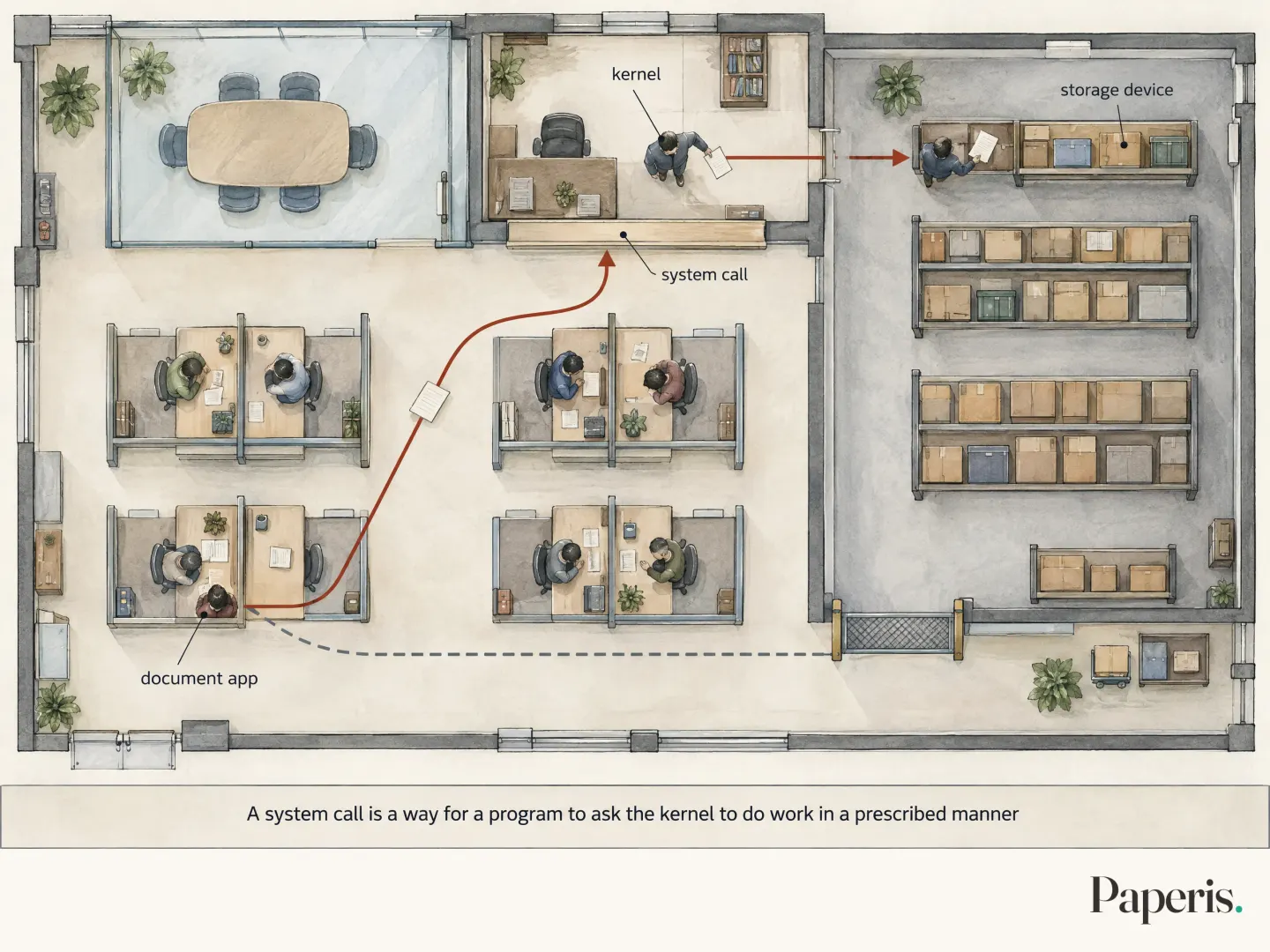
Keeping the route working this way makes it convenient when changing devices. A device driver is a program containing instructions on how to directly manipulate a specific device, enabling the operating system to use that device. Drivers are commonly written by the company that made the device, and sometimes by people participating in open development (OpenStax Introduction Computer Science 6.2). This is why you do not need to fix your music app even if you replace your speakers with a new pair (OpenStax Introduction Computer Science 6.1). Once the management office learns how to operate a new copy machine, the teams just need to keep saying "Please copy this" as they always did.
One Meeting Room, Many Teams
Back to the laptop in the morning. While the laptop is turned off, the music app is merely a list of instructions stored in storage. When you tap the icon, that list moves into memory and begins running (OpenStax Introduction Computer Science 6.3). A process is a running program—in other words, a single program that has been loaded into memory and is actually running. The music app, the document app, and the messenger each become their own processes (and a single app may use multiple processes), and the operating system manages them team by team separately (OpenStax Introduction Computer Science 6.3).
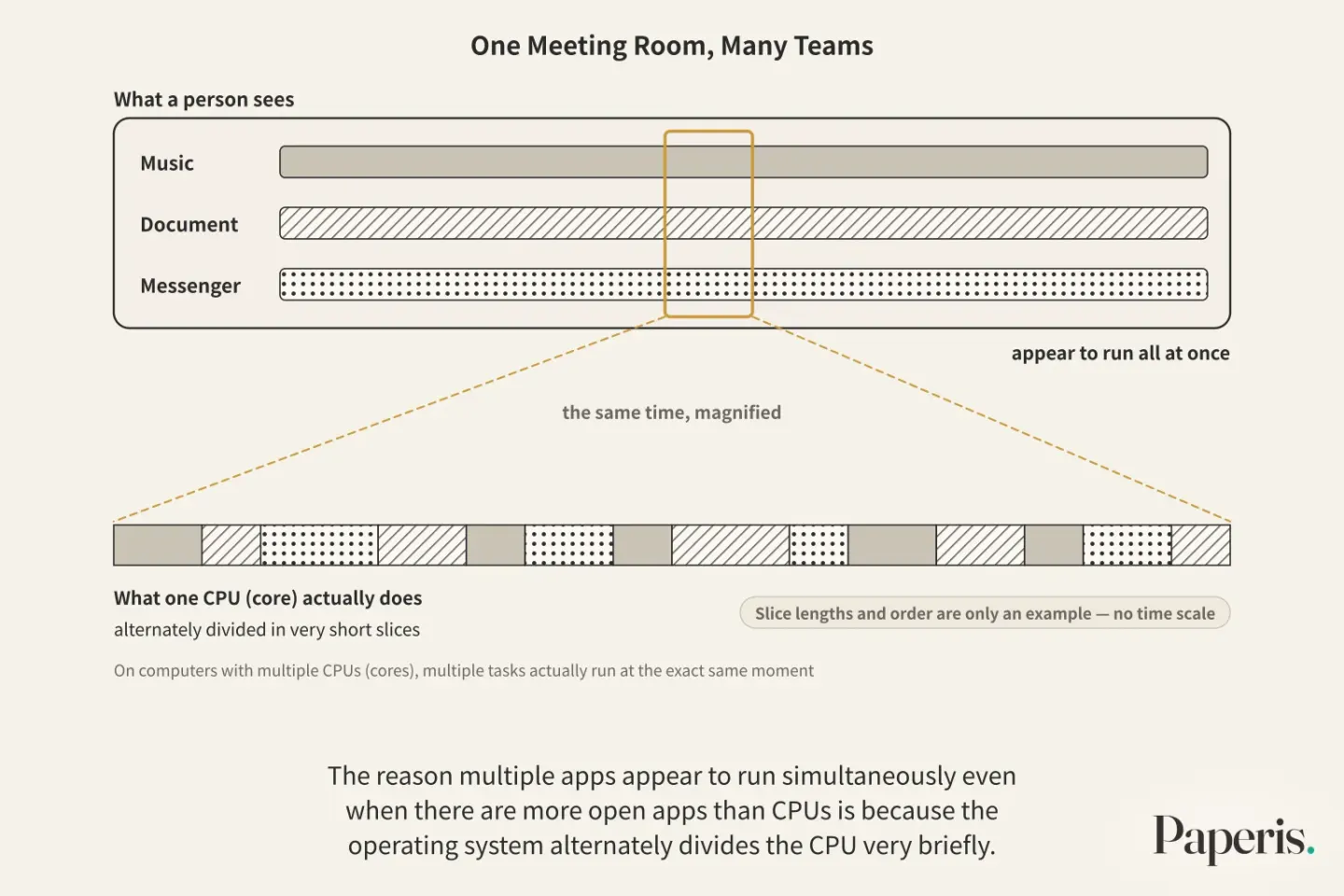
Even if there is only one CPU (core), it can split its time among multiple tasks (OpenStax Introduction Computer Science 6.3). Multitasking is a method where the operating system slices the CPU into short intervals and alternates them among multiple processes, running multiple programs at once. This is like having only one meeting room in a shared office, where instead of the caretaker giving one team the entire room for a whole day, they cut the time into short pieces and rotate it among multiple teams.
While waiting for a report to finish writing to storage, the document app has no use for the CPU. In the meantime, the CPU moves on to the turn of the music app or the messenger. Before handing it over, the operating system writes down how far the document app got, and when its turn comes back, lets it pick up right from that spot (OpenStax Introduction Computer Science 6.3).
Scheduling is the job of looking at the line waiting for a CPU turn and deciding who to let in first. There are various ways to decide the turn, and one of the goals those rules aim for is making an app respond right away to a button you press (OpenStax Introduction Computer Science 6.3).
The operating system switches this turn endlessly in very short slices (OpenStax Introduction Computer Science 6.3). Because those slices are short, to a human, the music, the document, and the messenger appear to run all at once. The reason multiple apps appear to run simultaneously even when there are more open apps than CPUs is because the operating system alternately divides the CPU very briefly. On computers with multiple CPUs (cores), multiple tasks actually run at the exact same moment (OpenStax Introduction Computer Science 6.3). Even so, if there are more open apps than CPUs, taking turns remains necessary.
Desks with Partitions
Even if a messenger app suddenly freezes, the report you were writing usually remains right there on the screen. Making sure that a breakdown in one app does not spread to the app next to it is the job of the operating system (OpenStax Introduction Computer Science 6.1), and a large part of that job is done by the way it divides up memory.
By default, the music app cannot read or alter the contents of the report that the document app has placed into memory (OpenStax Introduction Computer Science 6.4). In a shared office, this is like every team getting a desk with partitions, unable to look over at the documents on the neighboring team's desk. Virtual memory is a mechanism where the operating system connects the memory slot numbers called by a process to the actual locations on the chip, letting each process see only its own share of memory. The document app does not know where the slot it calls "my memory box number so-and-so" actually is on the actual chip (OpenStax Introduction Computer Science 6.4). The team only knows the positions within its own desk, and where those positions are on the entire floor is written only on the caretaker's seating chart.
If too many apps are left open and memory runs short, the operating system borrows a portion of the storage device to use in place of memory. However, storage devices are much slower than memory (OpenStax Introduction Computer Science 6.4). If you keep opening more apps, the laptop can fall into a state where it can barely do any calculations and is consumed entirely with moving data back and forth between memory and the storage device (OpenStax Introduction Computer Science 6.4).
The memory capacity and storage capacity listed in a laptop's specifications are numbers that count different things. Memory is the space where currently running work is placed, while storage space is the space that is kept even when the power is turned off (OpenStax Introduction Computer Science 6.1). Even if storage space is plentiful, that space cannot act as memory at the same speed.
Organizing Methods Placed on Top of Storage
You finish writing a report and save it in the "Work" folder under the name "Q3 Report." The storage device itself is a collection of slots that hold values. What name of report those values are, and which folder they are in, is information that the operating system records separately (OpenStax Introduction Computer Science 6.5).
A file is a piece of information handled as a single unit, stored on a storage device with a single name (OpenStax Introduction Computer Science 6.5). The "Q3 Report" is just one file. The file system is the part of the operating system that records file names and their locations on the slots of the storage device so that it can find the contents simply by being given the name (OpenStax Introduction Computer Science 6.5). This is like the caretaker attaching a name tag to each storage box and writing down on an inventory list which shelf it was placed on.
A directory is a list that gathers multiple files in one place and records where those files are located on the storage device (OpenStax Introduction Computer Science 6.5). On screen, this is commonly called a folder. Just as you can create "Q2" and "Q3" folders inside the "Work" folder, directories can go inside one another in layers (OpenStax Introduction Computer Science 6.5). Files and folders are organizing methods placed by the operating system on top of a storage device.
Who Can Open What
Two people log into and use a single laptop at home. One person's document folder does not open for the other person. Deciding who can open which files and enforcing it is also the job of the operating system (OpenStax Introduction Computer Science 6.6).
To do that, it must first know who is sitting in front of the laptop right now. Authentication is the act of verifying whether the person trying to enter right now is truly that person. The moment you enter your password on the login screen is the operating system's authentication (OpenStax Introduction Computer Science 6.6). Once the person is verified, what to permit that person remains. Authorization is the act of granting a verified person permission to see what and change what (OpenStax Introduction Computer Science 6.6).
After logging in, a user name tag follows every process that person runs (OpenStax Introduction Computer Science 6.6). That is why the operating system knows who launched an app whenever that app tries to open something. On mobile phone operating systems like Android, not just people but also individual apps receive separate permissions to touch things like photos or locations. Some malicious apps try to steal user personal information by requesting more permissions than necessary for their work (DOI: 10.4018/978-1-5225-2154-9.ch004).
One Small Gap and a Patch
A management office's verification procedure can leave an entire floor vulnerable if just one spot is lax. The same goes for an operating system's protective mechanisms (OpenStax Introduction Computer Science 6.6).
A vulnerability is a weak spot in a system that an attacker can exploit to cause unintended behavior. Malware is software created to cause harm without the user's knowledge. Malware targets software vulnerabilities or bugs, allowing it to do things that should be blocked or to extract data that should be untouchable (DOI: 10.1002/spy2.81).
A patch is a revision released to fix vulnerabilities in software that has already been released. Operating system updates sometimes include such patches.
Back in Front of the Laptop in the Morning
We trace the opening scene once again. Pressing the power button has the startup code load the operating system, and the kernel takes its place. The music app, the document app, and the messenger each become a process, running inside their own partitioned memories. Because scheduling hands out the CPU in short slices alternately, all three appear to run at the same time. When you press the save button, the document app asks the kernel through a system call, and the file system writes "Q3 Report" into the "Work" directory. Whether that folder opens is determined by permission the logged-in person received through authentication.
The shared office analogy is useful up to this point, and diverges in two places. First, the caretaker is a person who listens to a team's circumstances and makes judgments, but the operating system does not understand circumstances. What the operating system follows when it sets turns and divides spaces are rules decided in advance (OpenStax Introduction Computer Science 6.1). Second, the caretaker stands separately outside the meeting room, but since the kernel is also a program, to do work it must switch the CPU to kernel mode and use the same CPU (OpenStax Introduction Computer Science 6.4). The caretaker too must briefly borrow and use the same meeting room.
Where to Look Further
How the CPU processes commands and the difference between memory and storage are covered in another part of this series, "CPU and Memory — A Desk That Gets Cleared, Library Stacks That Stay". How humans write and translate apps as programs continues in "Programs and Programming Languages — A Score Written by People, a Piano That Plays Only the Holes", and the outside world where computers exchange data over networks continues in "The Internet — Boxes Shipped in Pieces, a Sorting Hub at Every Fork".
To see more broadly what authentication, authorization, and patches protect, you can go to "Security — Unseen by Others, Unchanged in Secret, Open When Needed". How you prove who you are when logging in is covered by "Passwords and Passkeys — How Do You Prove You Are You?". You can see an actual accident caused by a program reading outside its allocated memory in "Heartbleed and OpenSSL — When One Bounds Check Was Missing".
Source Papers
- "Introduction to Computer Science — 6.1 What Is an Operating System?" (2024) — OpenStax Introduction Computer Science 6.1 — Examples of operating systems, volatile memory and persistent storage, apps do not manipulate hardware directly and the operating system does it instead, the kernel runs constantly and provides basic services, privileged instructions prevent apps from breaking limits, system calls, isolation means apps do not need to be rewritten when hardware changes, preventing programs from interfering with each other and crashing, policies, and lines of code (Linux 27 million, Windows over 50 million).
- "Introduction to Computer Science — 6.2 Fundamental OS Concepts" (2024) — OpenStax Introduction Computer Science 6.2 — User interfaces are graphic screens or command lines, dual mode separates user mode and kernel mode, device drivers handle specific devices directly and are made by manufacturers or open developers, and operating systems boot by relying on startup code.
- "Introduction to Computer Science — 6.3 Processes and Concurrency" (2024) — OpenStax Introduction Computer Science 6.3 — Programs in storage are passive and become processes when loaded into memory and run, a single app may use multiple processes, multitasking runs multiple processes in time slices, waiting processes do not use the CPU and have their state saved and restored, scheduling and response time, and true simultaneous execution on multi-processors.
- "Introduction to Computer Science — 6.4 Memory Management" (2024) — OpenStax Introduction Computer Science 6.4 — Memory access between processes is blocked by default, kernel mode is set at startup and user mode when apps start, system calls are user mode requesting work from kernel mode, address translation in virtual memory, and when memory runs short it is offloaded to disk, but disks are much slower and excessive offloading gets stuck on moving data.
- "Introduction to Computer Science — 6.5 File Systems" (2024) — OpenStax Introduction Computer Science 6.5 — Files are bundles of information stored on storage devices, file systems name, store, and retrieve files, directories connect names to locations and can be nested, and files are values on disk while directories are their metadata.
- "Introduction to Computer Science — 6.6 Reliability and Security" (2024) — OpenStax Introduction Computer Science 6.6 — Authorization determines who can read, modify, and delete files, authentication verifies users with passwords, logged-in user IDs are attached to processes, and a single small flaw in protection devices can collapse the whole system.
- "Android Permissions" (2017) — DOI: 10.4018/978-1-5225-2154-9.ch004 — Some malicious apps demand more permissions than needed to abuse personal data (a book chapter).
- "A study of hardware architecture based attacks to bypass operating system security" (2019) — DOI: 10.1002/spy2.81 — Malware targets software vulnerabilities, bugs, and loopholes to elevate privileges or extract inaccessible data.
Sources (8)
- Introduction to Computer Science — 6.1 What Is an Operating System?
- Introduction to Computer Science — 6.2 Fundamental OS Concepts
- Introduction to Computer Science — 6.3 Processes and Concurrency
- Introduction to Computer Science — 6.4 Memory Management
- Introduction to Computer Science — 6.5 File Systems
- Introduction to Computer Science — 6.6 Reliability and Security
- Android PermissionsDOI 10.4018/978-1-5225-2154-9.ch004
- A study of hardware architecture based attacks to bypass operating system securityDOI 10.1002/spy2.81