Paperis Articles
Bits and Data — Raised Dots and Flat Spots, a Code the Fingertips Know
A computer holds numbers, letters, pictures and sounds by stringing together bits, spots that tell only two things apart. What a given row of bits means is set by the agreement used to read it, and compression rewrites that row shorter.
Your field's papers, as audio
Pick your fields and journals — Paperis summarizes the key papers and turns them into audio. Listen on your commute.
Start Paperis free →Bits and Data — Raised Dots and Flat Spots, a Code the Fingertips Know
Reading with Fingertips
When you open a braille book, small dots rise up on the paper. A single braille cell has six positions where a dot can be placed, and the reader feels with their fingertips whether a dot is raised or flat at each position. Depending on how the six positions are mixed, what that cell means is determined.
All that is on the paper is raised dots and flat positions. What letter to read that shape as is determined by an agreement made in advance between the writer and the reader. The exact same shape becomes a letter or a number depending on a marker placed right before it.
A single photo, a single song, and a single line of message stored in a mobile phone are stored in a way similar to this. Using a single braille cell as a guide, this article follows how numbers and letters, pictures and sounds are stored starting from a position that distinguishes only two things, and how what is stored in that way is compressed when it becomes too large.
The Spot That Distinguishes Just Two Things
Computers do not understand human language, and everything contained inside the computers we use is a line of lined-up 1s and 0s (OpenStax Introduction Computer Science 5.1). A single spot that holds either a 0 or a 1 is called a bit. In terms of Braille, it is a single dot position.
Here, 0 and 1 are names humans gave to two states that a component distinguishes. Just as a position in a Braille cell is either raised or flat, a single bit is one of two states. Inside the chip that calculates, the basic components making up the processor have only these two states—letting current flow and blocking it—and those two states correspond to 1 and 0 (OpenStax Introduction Computer Science 5.2). How that component opens and closes the current is covered by "A Transistor Is a Switch — A Tiny Faucet You Open and Close with Electricity".
Bits are also counted by grouping them into sets of eight. A byte is a unit that counts eight bits as a single bundle. Things contained in computers are stored as lines of bits and bytes (OpenStax Introduction Computer Science 5.1).
The ingredients contained in that line have a separate name that calls them. Data is the material that a computer holds and handles, such as songs, photos, and text. A song downloaded to a cellphone is also data (OpenStax Introduction Computer Science 5.1), and every single photo piled up in the photo gallery is as well. Songs, photos, and text are all alike inside a computer as lines of the same two states.
Every Time a Single Position Is Added
Imagine adding one dot position to a Braille cell. Each pattern that could be made until then branches into two again, depending on whether the new position pops up or stays flat. Bits are the exact same. Every time you chain one more bit, the number of cases you can represent doubles (OpenStax Introduction Computer Science 5.3). That is why a Braille cell with six dot positions doubles six times over to make 64 patterns, and eight bits—that is, 1 byte—doubles eight times over to distinguish 256 patterns.
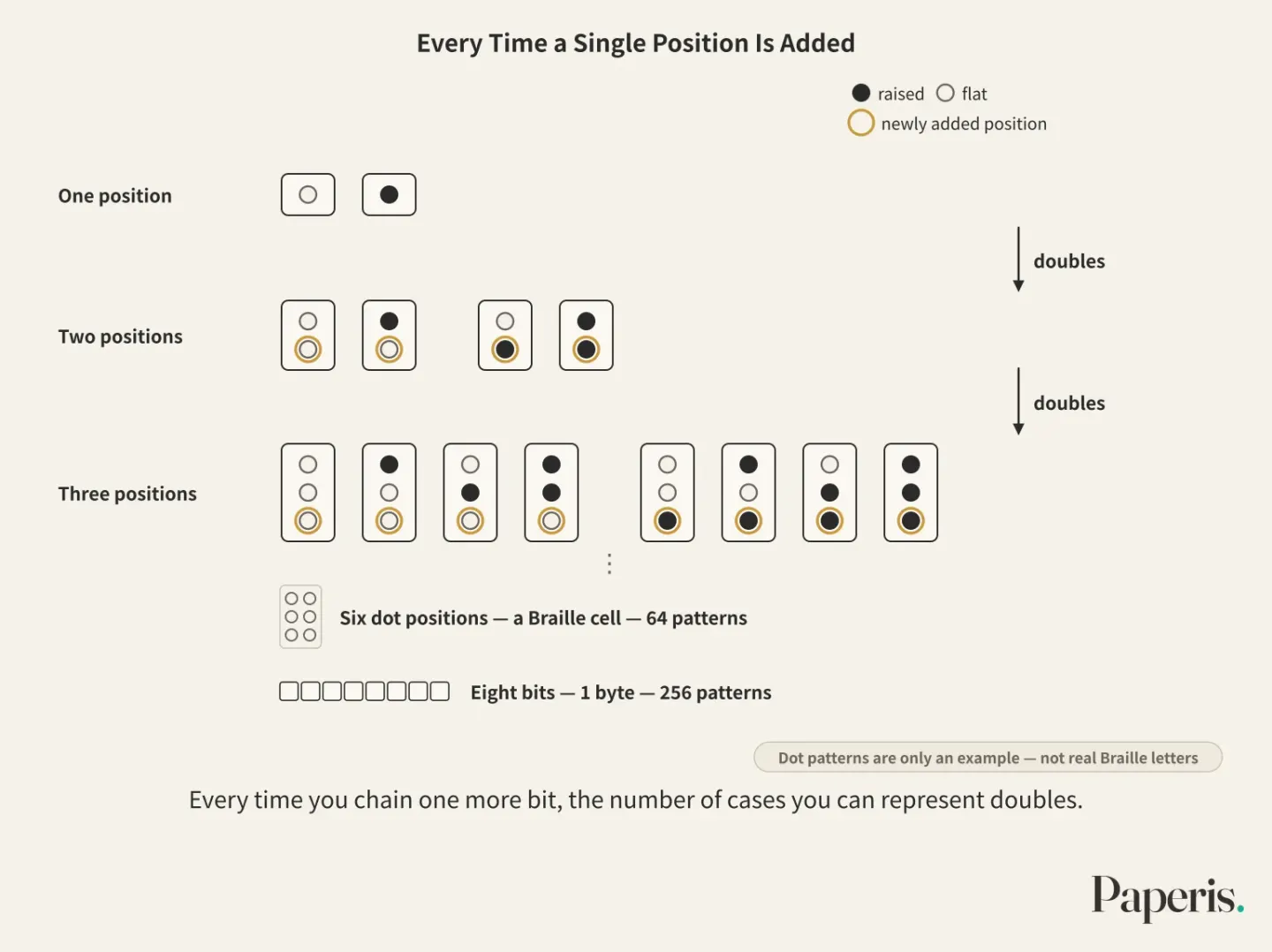
If you attach numbers to these cases in order, you can count. Binary is a method of representing numbers using only two digits, 0 and 1. In the decimal system we usually use, every time you move one place to the left, the place value becomes ten times larger, and in binary, it becomes twice as large (OpenStax Introduction Computer Science 5.3). Therefore, the place values in binary grow from the right as 1, 2, 4, and 8. For example, if you write "110" in binary, 4 is there once, 2 is there once, and there is no 1, so it is 6 in decimal.
In the early days of computers, academia and the industry argued sharply over whether to build the inside of machines in decimal or binary, and the argument ended in favor of binary. Every computer currently on the market has a binary internal structure. A column in a spectroscopy magazine points out that, especially in fields handling chemical data, traces of that argument remain as unexpected errors when computers transfer data between each other (DOI: 10.56530/spectroscopy.mm1179p4).
Numbers Assigned to Letters
Just as a Braille rules table assigns a letter to each dot pattern, computers also assign a number to each character. Even a single line of greeting sent to a friend passes through the computer converted into a single binary number for each character (OpenStax Introduction Computer Science 5.3). A character encoding is an agreement on which number to assign to each letter. Because the writing must be transmitted intact even if the sending computer and the receiving computer are different machines, this numbering table is set as a standard followed jointly by multiple machines (OpenStax Introduction Computer Science 5.3).
A representative character encoding that has been used for a long time is ASCII. ASCII is a character encoding that assigns numbers to English alphabets, numbers, and symbols, and was approved in 1963. Initially, ASCII held 128 characters using 7 bits (OpenStax Introduction Computer Science 5.3). According to the calculation in the previous section, 7 bits distinguish 128 items, so each of those items was assigned to a single letter.
Problems that arose as the world's writings began to travel over the internet eventually created the need for a new numbering table (DOI: 10.3998/jep.5528). Unicode is a character encoding created to contain all the world's characters, keeping the first 128 numbers identical to ASCII. Because the front numbers are the same as ASCII, it can be used together with older systems that used ASCII (OpenStax Introduction Computer Science 5.3).
Just as the numbering table has grown, the space taken up by a single character also varies. Even though an ASCII character is fixed at 7 bits, it takes up 1 byte per character when stored, whereas a single Unicode character takes anywhere from 1 byte to 4 bytes depending on how it is written and stored (DOI: 10.21917/ijsc.2018.0227). Problems tangled with character encodings are not uncommon in fields where research data is archived (DOI: 10.7191/jeslib.2021.1211). If read with a different numbering table from the sender's, the exact same string of bits is transformed and displayed as garbled text.
Pictures as Grid Cells, Sound as Numbers
If you keep spreading your fingers on your phone to zoom in on a photo, at some point the smooth outline breaks apart into small squares. Digital pictures, like phone photos, store a color value in each of the grid cells divided like a go board (DOI: 10.1002/col.21768). A pixel is a single grid cell that makes up a digital picture, and a single color is assigned to each cell.
The color of a cell is written down as numbers. Commonly, how strong red, green, and blue are individually is written as numbers, and the color mixed from those three is taken as the color of one cell (DOI: 10.1002/col.21768). There is a convention to the way those numbers are assigned, too. Most methods used for computer screens, high-definition broadcasting, and digital movies assign numbers so that when you change the value a little bit, it looks differently by a similar amount whether on the dark side or the bright side (DOI: 10.1002/col.21768). A single photo is ultimately a long list of numbers written for each cell.
Sound also becomes numbers. When you speak into a microphone, that sound is converted into 1s and 0s and stored inside the computer, and when it goes out to a speaker, the 1s and 0s are converted back into sound (OpenStax Introduction Computer Science 5.1). A saved song is a bundle of numbers, and the computer reads those numbers to produce sound (OpenStax Introduction Computer Science 5.1). Letters as numbers, pictures as color values for each cell, and sound as bundles of numbers—all are contained in strings of bits.
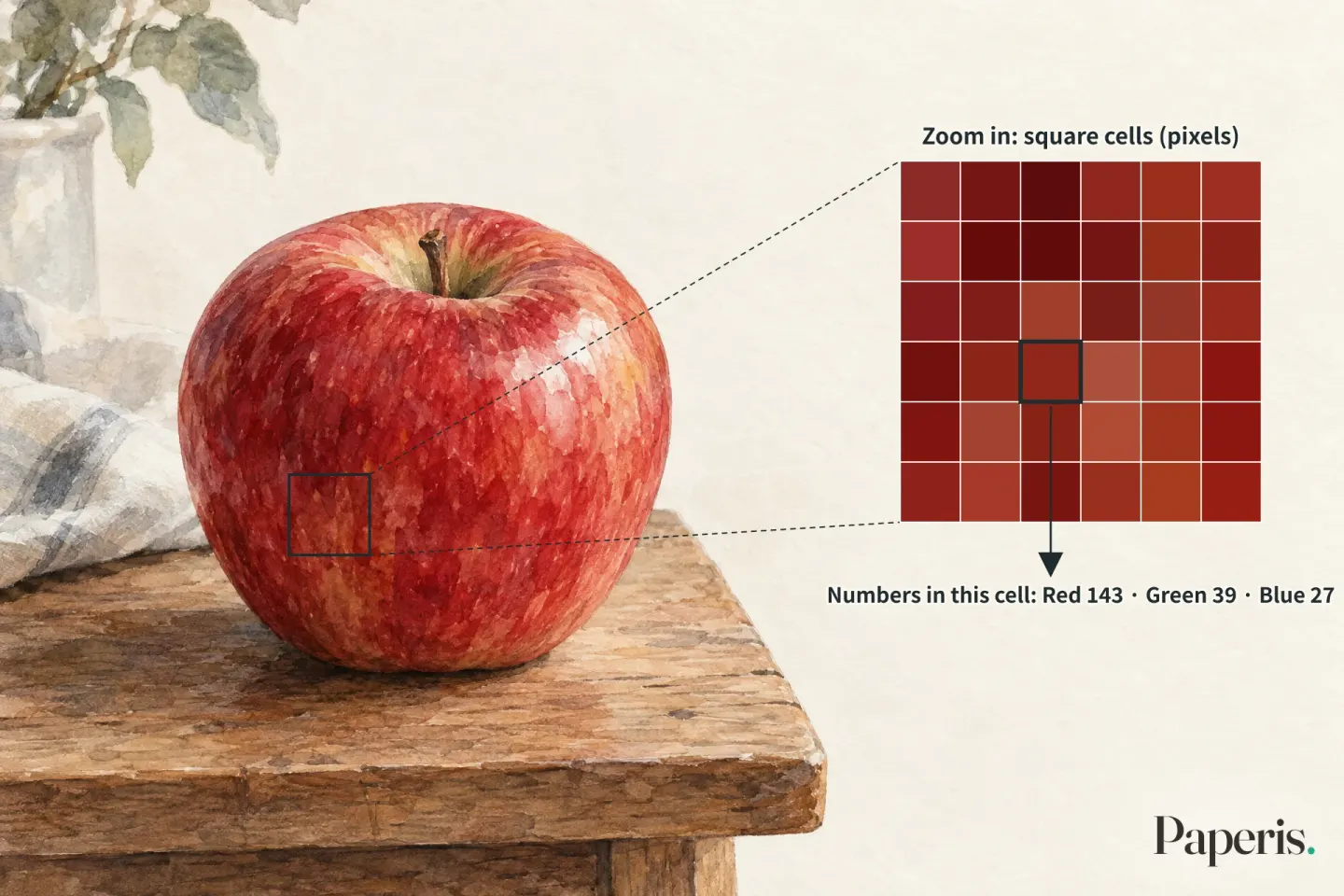
Illustration: Paperis (lines and labels drawn from the article)
The Same Eight Digits, Three Meanings
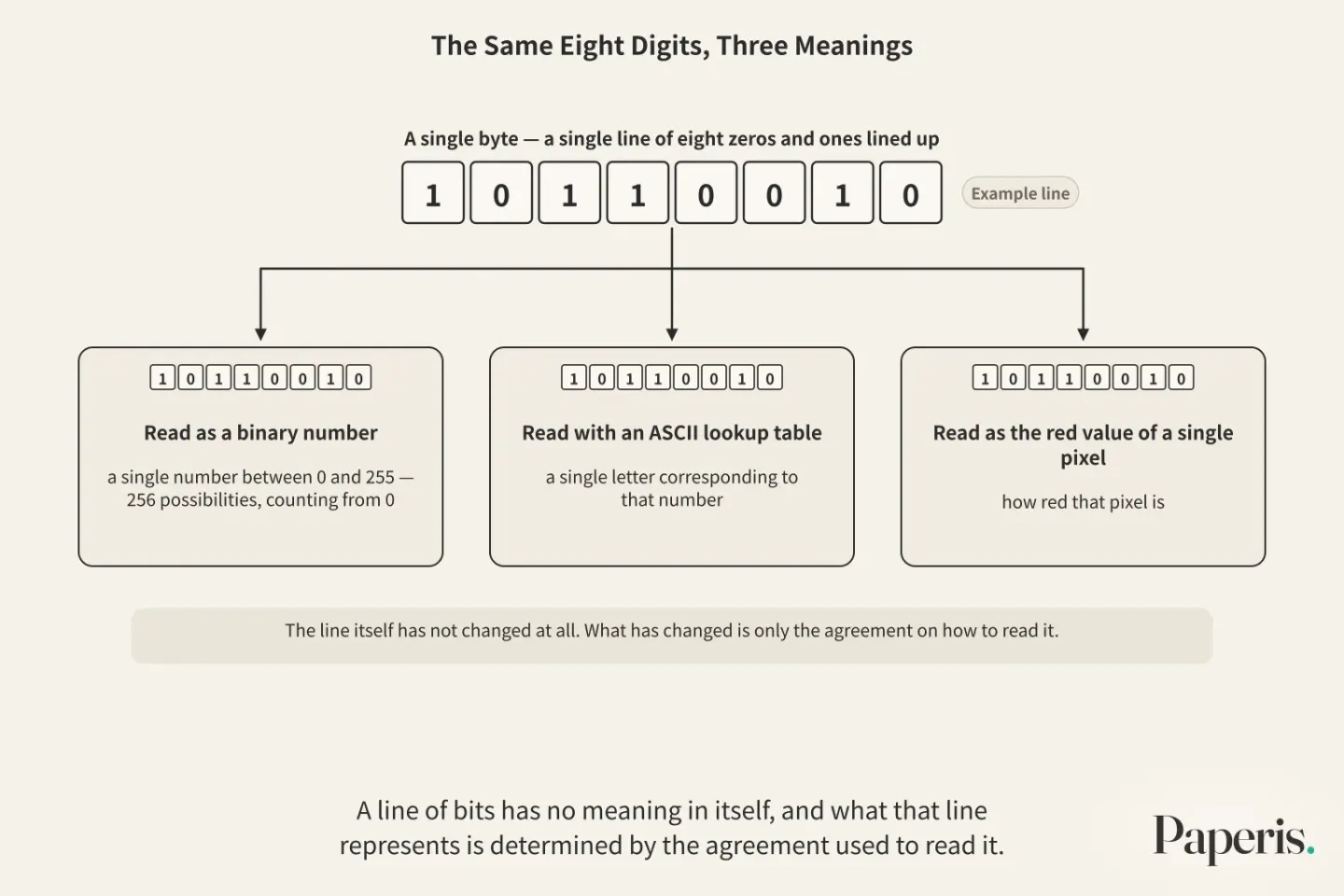
Let us say you hold in your hand a single byte—a single line of eight zeros and ones lined up. If you read this line as a binary number, it becomes a single number between 0 and 255 (OpenStax Introduction Computer Science 5.3). Since we start counting from 0, there are 256 possibilities. If you read it with an ASCII lookup table, it becomes a single letter corresponding to that number. If you read it as the red value of a single pixel in an image, it becomes how red that pixel is.
The line itself has not changed at all. What has changed is only the agreement on how to read it. A line of bits has no meaning in itself, and what that line represents is determined by the agreement used to read it (OpenStax Introduction Computer Science 5.3). It is just like a single braille cell that becomes either a letter or a number depending on the preceding indicator.
Other data that are not numbers or letters, such as pictures or sounds, have multiple ways of being stored, and among them, some ways have their rights held by their creators (OpenStax Introduction Computer Science 5.3). Such data can only be opened properly if you have an app that knows that agreement.
How to Count Size
Data size is counted in bytes. When countless bytes gather, larger units are used. A megabyte is a unit of size made by gathering roughly 1 million bytes. About 1 million bytes make one megabyte, and gigabytes are used as a larger unit than that (OpenStax Introduction Computer Science 5.1).
Even for the same content, the size varies depending on the convention used to write it. As we saw earlier, the same character takes 1 byte in ASCII and 1 to 4 bytes in Unicode (DOI: 10.21917/ijsc.2018.0227). Images use many bits (DOI: 10.14419/ijet.v7i3.34.19706). This is because color values are written for each square.
Two Paths to Reduction
Large data is burdensome both to store and to send far away. Therefore, the same content is rewritten in shorter lines (DOI: 10.14419/ijet.v7i3.34.19706). Compression is the work of rewriting data with fewer bits to reduce its size. Compressing reduces the cost of storing and sending it (DOI: 10.5194/gmd-12-4099-2019). There are two paths to compression.
The first path throws nothing away. Lossless compression is compression where, when reduced and revived, it returns exactly to the original down to the very last bit. Since not a single piece of information is lost, the revived data is identical to the original (DOI: 10.14419/ijet.v7i3.34.19706). The reason it still shrinks is because there is overlapping information within the data. In a photograph, neighboring pixels are often similar to each other, so a method of guessing the next pixel by utilizing that overlap is used (DOI: 10.47893/ijeee.2014.1125).
The second path throws some things away. Lossy compression is compression that reduces size much further by throwing away some information to an extent that is acceptable given its use. What is thrown away does not return even when revived, but it achieves a much larger reduction with an acceptable loss (DOI: 10.14419/ijet.v7i3.34.19706). In the case of a photograph, it throws away information that does not look very different to the human eye (DOI: 10.31294/jki.v8i1.7759).
The difference between the two paths is also revealed in numbers. When data from a mass spectrometer used for protein and metabolite analysis was reduced using a compression tool, it became smaller by an average of 76% with lossless compression, and by an average of 94% with lossy compression by setting an allowable error margin. These figures are the results of testing that kind of data with that tool (DOI: 10.1093/bioinformatics/btab636).
Even though lossy compression can reduce space further in genome sequencing data, lossless compression is still needed for many uses (DOI: 10.1093/bioinformatics/btaa543). In some areas of medical imaging, methods are also being researched that preserve only the parts important for diagnosis losslessly while reducing the rest further (DOI: 10.47893/ijeee.2014.1125). Whether there is anything that can be thrown away is determined by what the data is used for.
The Path a Single Photo and a Line of Greeting Take
Now let's trace what we have learned all at once. Suppose you send a friend a photo, a short line of greeting, and a single voice message using your phone.
The line of greeting is turned character by character into numbers from the Unicode lookup table, and those numbers become a line of bits ranging from 1 byte to 4 bytes depending on how they are written (DOI: 10.21917/ijsc.2018.0227). A photo is a long list of numbers with red, green, and blue values recorded for each cell, and that list is ultimately a line of bits (DOI: 10.1002/col.21768). Voice passes through a microphone to become a bundle of numbers (OpenStax Introduction Computer Science 5.1). All three have become lines of 0s and 1s, and you cannot tell just by looking at the line whether it is text, color, or sound (OpenStax Introduction Computer Science 5.3).
The photo is usually the largest line among them. If you reduced and sent this photo using lossy compression, the photo your friend received is not identical to the original down to every single bit. Because information that is not very noticeable to the eye was discarded, it looks almost the same.
Your friend's phone reads the received line backward using the same convention. It matches the numbers against the Unicode lookup table to turn them back into letters, turns the values for each cell back into colors, and turns the bundle of numbers back into sound. If even one of these is read using a different convention, the line remains the same but a nonsensical result comes out. If it is text, unreadable symbols appear. This is just like how a message can only be conveyed if both the sender and the receiver are holding the same Braille rulebook.
Back in Front of Braille
The Braille analogy diverges from reality in two places. First, Braille is read by a person with their fingertips. The parts inside a computer merely distinguish between two states, and the job of converting that string of data into characters or colors is also calculated according to rules that humans predetermined. Second, a Braille dot is a shape that can be felt by hand. Inside a computing chip, a bit is a state in which a component either allows an electric current to flow or blocks it (OpenStax Introduction Computer Science 5.2), and the numbers 0 or 1 are not actually written on that state.
Still, what a single cell of Braille teaches us remains intact. If you string together multiple positions that distinguish only two things, the number of cases doubles each time, and if you attach rules to those combinations, they can become numbers, letters, pictures, or sound. Rules determine whether the same string of 0s and 1s should be read as a number, a letter, or a color.
Where to Look Next
The component that creates the two states of a bit inside a chip is covered in "A Transistor Is a Switch — A Tiny Faucet You Open and Close with Electricity". Where data contained in bits is placed inside a computer, what disappears when you turn off the power, and what remains are covered in another part of this series, "CPU and Memory — A Desk That Gets Cleared, Library Stacks That Stay".
The process by which data is broken into small pieces and sent when traveling to a distant computer is covered in another part of this series, "The Internet — Boxes Shipped in Pieces, a Sorting Hub at Every Fork". Character encoding, which turns letters into numbers, is a public promise used together by everyone and does not hide the contents. Locking contents so others cannot read them is covered in "Encryption — The Content Is Locked, but the Record of Comings and Goings Remains".
Source Papers
- "Introduction to Computer Science — 5.1 Computer Systems Organization" (2024) — OpenStax Introduction Computer Science 5.1 — Computers, which run on electricity, store programs and data as lines of 1s and 0s, 8 bits make a byte, a song is data and a bundle of numbers, microphone input turns into 1s and 0s, a megabyte is roughly 1 million bytes, gigabyte unit.
- "Introduction to Computer Science — 5.2 Computer Levels of Abstraction" (2024) — OpenStax Introduction Computer Science 5.2 — The basic components that make up a processor (transistors) have only two states, ON which allows current to flow and OFF which blocks it, and those two states correspond to 1 and 0.
- "Introduction to Computer Science — 5.3 Machine-Level Information Representation" (2024) — OpenStax Introduction Computer Science 5.3 — A line of bits has no meaning on its own, n bits yield 2 to the n-th power of possibilities (0 to 2 to the n-th power minus 1), decimal multiplies by ten per digit and binary by two, why each character has a unique binary number and a standard, ASCII approved in 1963 and 7 bits for 128 characters, Unicode holds all characters and its first 128 are ASCII so it is used alongside older systems, data that are neither numbers nor letters come in various formats and some have rights attached.
- "Decimal Versus Binary Representation of Numbers in Computers" (2022) — DOI: 10.56530/spectroscopy.mm1179p4 — Early debates over internal decimal versus binary representation were settled in favor of binary, and all commercial computers use a binary structure, but traces of this remain as an unexpected source of errors when moving data between computers, especially in the field of chemical data analysis (magazine column).
- "Encoding Multilingualism: Technical Affordances of Multilingual Publication from Manuscripts to Unicode and OpenType" (2024) — DOI: 10.3998/jep.5528 — The problems created by the internet and global text transmission made Unicode necessary (history based on the Unicode archive).
- "LOSSLESS TEXT COMPRESSION FOR UNICODE TAMIL DOCUMENTS" (2018) — DOI: 10.21917/ijsc.2018.0227 — ASCII characters take 1 byte, while Unicode characters take 1 to 4 bytes depending on the storage method.
- "Plain Text & Character Encoding: A Primer for Data Curators" (2021) — DOI: 10.7191/jeslib.2021.1211 — Plain text is a line of encoded characters (code points), and text encoding issues are not uncommon in research data curation.
- "Perceptual uniformity in digital image representation and display" (2013) — DOI: 10.1002/col.21768 — The red, green, and blue components of a pixel are represented as numbers (code values), and most methods, such as sRGB and BT.709, encode them so that small changes in value are perceived similarly across the entire range.
- "Comparative Study of Lossy and Lossless Image Compression Techniques" (2026) — DOI: 10.14419/ijet.v7i3.34.19706 — Images use many bits, lossless compression achieves high compression without information loss, and lossy compression achieves it with acceptable loss.
- "IMPLEMENTASI KOMPRESI CITRA DIGITAL DENGAN MEMBANDINGKAN METODE LOSSY DAN LOSSLESS COMPRESSION MENGGUNAKAN MATLAB" (2020) — DOI: 10.31294/jki.v8i1.7759 — Lossy compression discards some information while ensuring no major changes to the human eye.
- "LOSSLESS AND LOSSY IMAGE COMPRESSION BASED ON DATA FOLDING" (2014) — DOI: 10.47893/ijeee.2014.1125 — Compression that uses redundancy of neighboring pixels for prediction, and a method in medical imaging that keeps only the region of interest lossless.
- "Evaluation of lossless and lossy algorithms for the compression of scientific datasets in netCDF-4 or HDF5 files" (2019) — DOI: 10.5194/gmd-12-4099-2019 — Compression is required to reduce the storage and transmission costs of growing scientific data.
- "mspack: efficient lossless and lossy mass spectrometry data compression" (2021) — DOI: 10.1093/bioinformatics/btab636 — In mass spectrometry data, lossless compression achieves an average 76% and lossy an average 94% file size reduction (bsc backend, loss based on set error bound, compared to original).
- "ScaleQC: a scalable lossy to lossless solution for NGS data compression" (2020) — DOI: 10.1093/bioinformatics/btaa543 — Lossy compression can reduce space further, but many applications still require lossless compression.
Sources (14)
- Introduction to Computer Science — 5.1 Computer Systems Organization
- Introduction to Computer Science — 5.2 Computer Levels of Abstraction
- Introduction to Computer Science — 5.3 Machine-Level Information Representation
- Decimal Versus Binary Representation of Numbers in ComputersDOI 10.56530/spectroscopy.mm1179p4
- Encoding Multilingualism: Technical Affordances of Multilingual Publication from Manuscripts to Unicode and OpenTypeDOI 10.3998/jep.5528
- LOSSLESS TEXT COMPRESSION FOR UNICODE TAMIL DOCUMENTSDOI 10.21917/ijsc.2018.0227
- Plain Text & Character Encoding: A Primer for Data CuratorsDOI 10.7191/jeslib.2021.1211
- Perceptual uniformity in digital image representation and displayDOI 10.1002/col.21768
- Comparative Study of Lossy and Lossless Image Compression TechniquesDOI 10.14419/ijet.v7i3.34.19706
- IMPLEMENTASI KOMPRESI CITRA DIGITAL DENGAN MEMBANDINGKAN METODE LOSSY DAN LOSSLESS COMPRESSION MENGGUNAKAN MATLABDOI 10.31294/jki.v8i1.7759
- LOSSLESS AND LOSSY IMAGE COMPRESSION BASED ON DATA FOLDINGDOI 10.47893/ijeee.2014.1125
- Evaluation of lossless and lossy algorithms for the compression of scientific datasets in netCDF-4 or HDF5 filesDOI 10.5194/gmd-12-4099-2019
- mspack: efficient lossless and lossy mass spectrometry data compressionDOI 10.1093/bioinformatics/btab636
- ScaleQC: a scalable lossy to lossless solution for NGS data compressionDOI 10.1093/bioinformatics/btaa543