
Paperis Articles
CPU and Memory — A Desk That Gets Cleared, Library Stacks That Stay
A CPU keeps fetching instructions from memory in sequence, decoding them and executing them. Memory is wiped when the power goes off while storage keeps its contents, and memories that are faster but smaller and costlier are stacked in layers so that what is used often stays close to the CPU.
Your field's papers, as audio
Pick your fields and journals — Paperis summarizes the key papers and turns them into audio. Listen on your commute.
Start Paperis free →CPU and Memory — A Desk That Gets Cleared, Library Stacks That Stay
Two Numbers on the Specification Sheet
When you choose a new phone and look at the specification sheet, two similar-looking numbers are written side by side. For example, "8 GB RAM" and "256 GB storage space". Since both are written in gigabytes, it looks like the same thing was measured twice.
The two numbers are the sizes of different parts. One is the size of the space where you spread out the work you are currently doing, and the other is the size of the space where you keep photos and apps for a long time. When the power is turned off, the former space is emptied and the latter space remains as it is. This article starts from that difference to follow what parts a computer is made of, in what order the parts that process work move, and why the remembering space is divided into multiple tiers.
As a guide, we bring in a library reading room. One person sits at a reading room desk and works. The desk is narrow but within arm's reach, and the stacks are large, but going there and back takes a while. When the reading room closes, the top of the desk is cleaned up neatly, and the books in the stacks remain as they are. In this article, the person sitting at the desk is the CPU, the desk is the memory, and the stacks are the place for long-term storage.
What You Can Touch and What Is Written Down
When you hold a phone, glass and metal touch your hands. A photo app appears on the screen, and the next photo appears every time you swipe with your finger. Neither the app nor the photo can be touched by hand, but the two do different things. The app is a note specifying what to do, and the photo is the material that the app pulls out and shows (OpenStax Introduction Computer Science 5.1). A phone is divided into the glass, metal, and chips that you can touch, and things you cannot touch like apps and photos (OpenStax Foundations Information Systems 1.1). Hardware is the physical parts of a computer that you can touch, and software is a program that writes down what those parts should do. A program is a collection of instructions that tells the computer what to do step by step.
Hardware can be divided into four branches depending on the job it handles. These are the part that processes work, the part that holds what is currently in use, the part that stores things for a long time, and the part that exchanges things with the outside.
The first is the part that processes work. The CPU (Central Processing Unit) is the component that fetches program instructions in order, calculates them, and processes them. It is also called a processor (OpenStax Introduction Computer Science 5.1). In a reading room, it is the person sitting at a desk and working.
The second is the part that holds what is currently in use. Memory is a chip that holds data to be used for calculations and hands it over when needed. The memory holds program instructions along with data (OpenStax Introduction Computer Science 5.1). When the power is turned off, the contents of the memory disappear (OpenStax Introduction Computer Science 5.5). The "RAM" on a specification sheet is precisely this memory. The name RAM is an English acronym meaning memory that can be accessed from any location regardless of order (OpenStax Introduction Computer Science 5.5). In a reading room, it is the desk.
The third is the part that stores things for a long time. A storage device is a component that keeps programs and data for a long time so that the contents remain intact even when the power is turned off. The "storage space" on a specification sheet is this. SSDs and hard disks handle this job, and both are slower than memory (OpenStax Introduction Computer Science 5.5). In a reading room, it is the stacks.
The fourth is the part that exchanges things with the outside. When you take a picture, the scene in front of the lens enters inside the phone, and the photo inside appears on the screen as light. Input and output devices turn what comes in from the outside into 0s and 1s inside the computer, and send out 0s and 1s from the inside by turning them into forms humans can see and hear. Whether coming in or going out, everything is handled as 0s and 1s inside the computer (OpenStax Introduction Computer Science 5.1). As for the reading room, it is the window that exchanges books with the outside.
Then how do these four move when you open an app? When you tap the icon, as if taking a book out of the stacks, the app's program and data are copied from the storage device to the memory. The CPU works after that by reading from the memory. This is because working directly from the storage device is too slow (OpenStax Introduction Computer Science 5.1). The "RAM" on a specification sheet is the area of the desk, and the "storage space" is the area of the stacks.
The Instructions Are on the Desk Too
What tasks the person in the reading room will do and in what order are written on a single instruction sheet. That instruction sheet is also a piece of paper taken out of the stacks and placed on the desk. The same thing happens in a computer.
Then what are a computer's instructions made of? They are lines represented as 0s and 1s. Inside a computer, both programs and photos are stored as lines of 0s and 1s, and if you read the lines for a program by cutting them into blocks of a certain number of spaces, each block becomes a single command (OpenStax Introduction Computer Science 5.1). Inside the memory chip, these 0s and 1s are names given to the state where a tiny component holds electricity and the state where it does not (OpenStax Introduction Computer Science 5.5). An instruction is a unit of work defined in 0s and 1s so that the CPU can recognize and process it all at once. What a single instruction does is usually small. It is on the level of adding two numbers, comparing two numbers, or fetching a number from one spot in memory (OpenStax Introduction Computer Science 5.1; OpenStax Introduction Computer Science 5.4). A list of instructions that it can recognize is fixed for each CPU family, so instructions made for one family may not be recognized by another (OpenStax Introduction Computer Science 5.2).
The 0s and 1s containing instructions are placed together in the same memory as the 0s and 1s containing photos (OpenStax Introduction Computer Science 5.5). The stored-program architecture is a computer design method that puts programs into memory just like data, and lets the CPU fetch and read instructions from there in order. The basic setup of such a computer is the CPU, its instruction list, and memory (DOI: 10.1002/0471497398.mm869). Just as the same person does completely different jobs if you simply swap out their instruction sheet, the same mobile phone becomes a photo album or a calculator just by opening a different app.
The idea of putting programs into memory is something whose shape was gradually formed through the contributions of many people over roughly 10 years, spanning multiple layers of concepts (DOI: 10.1007/978-3-319-22156-4_3).
Fetching, Decoding, and Executing
When you enter two numbers in a calculator app and press "=", multiple instructions are processed sequentially inside the CPU before the answer appears. We follow the path along which a single instruction is processed.
The first step is fetching. The CPU fetches the next instruction from memory into the CPU and places it in a register (OpenStax Introduction Computer Science 5.1). A register is a very fast storage slot inside the CPU that briefly holds a single instruction or number currently being processed. A single register slot holds only one thing (OpenStax Introduction Computer Science 5.4). It is a sticky note copied from a single line of an instruction sheet and held in hand by someone in a reading room.
The second step is decoding. The CPU reads the 0s and 1s of the fetched instruction to figure out what kind of task it is. The third step is execution. If you pressed "=", the actual addition of the two numbers happens here, and the answer remains in the register or goes back to memory (OpenStax Introduction Computer Science 5.1).
Finally, it moves on to the next instruction. The CPU has a separate register that records where the next instruction to be read is located in memory, and each time an instruction is finished, that slot changes to point to the next location (OpenStax Introduction Computer Science 5.4). The CPU repeats this process until the program ends (OpenStax Introduction Computer Science 5.1). What the CPU does is a repeating cycle of fetching instructions from memory, decoding what they are, and executing them (OpenStax Introduction Computer Science 5.6; DOI: 10.1002/0471497398.mm869).
The Clock That Keeps the Beat
CPU specifications often come with numbers indicating clock speed. The clock is a signal that beats time so that the circuits inside the CPU move forward together one step at a time. It is easy to think that a faster beat means a faster CPU, but there are at least three reasons why clock numbers alone cannot determine speed.
First, the amount of work done in a single beat varies by design. Just as a person in a reading room processes a current line while already reading the next line with their eyes, today's CPUs fetch the next instruction ahead of time while processing one instruction, and even process multiple instructions at once (OpenStax Introduction Computer Science 5.6).
Second, the clock could not be raised indefinitely. Around 2004, raising the clock further increased power consumption significantly, and chips subsequently moved toward packing multiple CPUs into a single chip (OpenStax Introduction Computer Science 5.6). A core is each individual CPU that processes instructions, with many contained together inside a single chip. The processors we use today contain multiple such cores (OpenStax Introduction Computer Science 5.6). Why the clock could not rise any further around that time is covered in detail in "Why Did the Clock Stop at 4 GHz — Dark Silicon and the Power Wall".
Third, if instructions and data arrive late, the CPU must wait (OpenStax Introduction Computer Science 5.5). No matter how fast your hands are, if the instructions and materials arrive late at your desk, work stops. You cannot determine which computer is faster based on the clock number alone.
The Desk Gets Cleared, the Stacks Stay
The moment a laptop battery runs out and it shuts off, everything held in memory disappears entirely (OpenStax Introduction Computer Science 5.5). On the other hand, files put into storage remain even when turned back on. Volatility is the property where held contents vanish when power is cut off. Memory is volatile, and storage is non-volatile (OpenStax Introduction Computer Science 5.5).
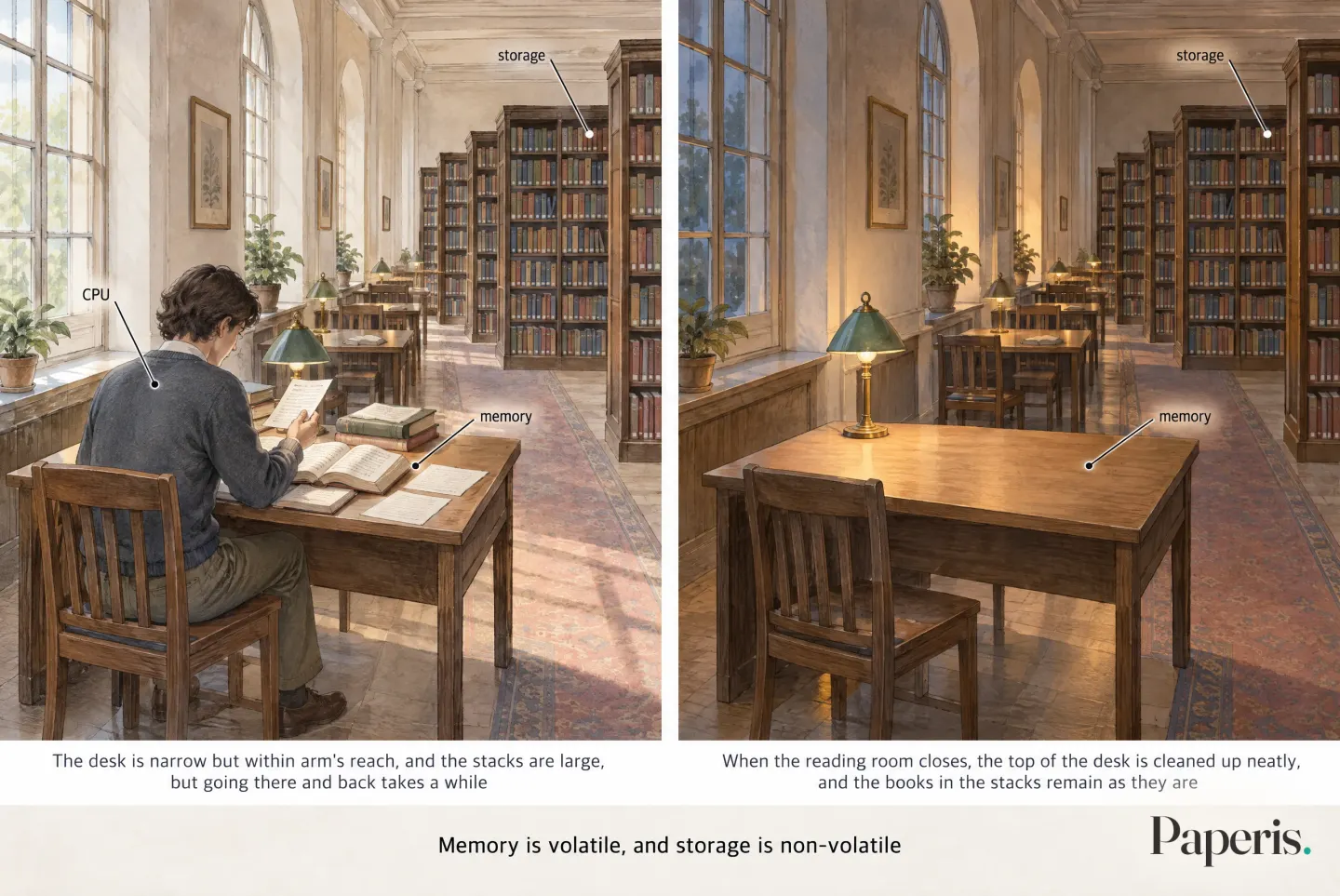
Now you can return to the specification sheet. The number for "RAM" is the amount that can be laid out all at once, and if memory is small, the things a computer can do decrease and overall performance drops as well (OpenStax Introduction Computer Science 5.5). The number for "storage space" is how many photos and apps can be tucked away inside. And memory capacity and speed are different numbers. Meanwhile, memory capacity has grown much faster than speed (OpenStax Introduction Computer Science 5.5).
Closer Means Smaller and Faster
A person in the reading room keeps a few pages they will flip through often today laid out at the front of the desk, within arm's reach. This is faster than searching the whole desk. Computers do the same thing.
Then what if we just made the desk as large as the stacks? Places within hand's reach are expensive to provide and get cleared away when you close for the day, while the stacks are cheap and last a long time, but they are far away. Computer memory works the same way; there is still nothing that has all three—fast, cheap, and surviving being turned off—at once (OpenStax Introduction Computer Science 5.5). That is why computers mix several kinds. The memory hierarchy is an arrangement stacked in layers, placing fast but small and expensive memory close to the CPU, and slow but large and cheap memory far away.
The closest layer is the registers inside the CPU. The next layer is the cache. A cache is a small but fast storage space placed inside or right beside the processor, holding data that will be used again soon. Because the cache has to fit into a tight spot on the same chip as the CPU, it is much smaller than memory (OpenStax Introduction Computer Science 5.5). Outside of that is memory, and the furthest outside is storage.
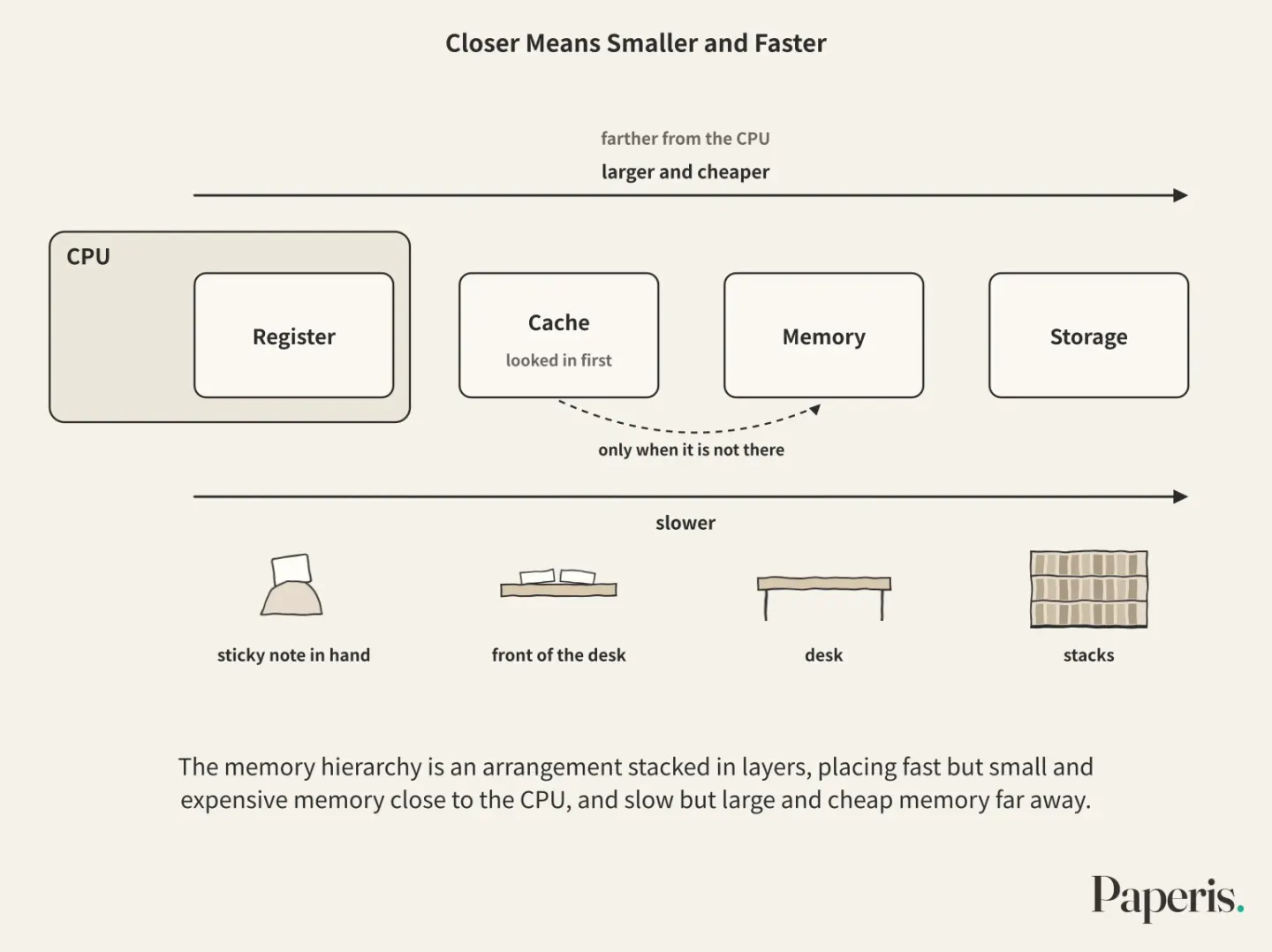
The person in the reading room looks for the needed chapter at the front of the desk first, and only rummages through the desk when it is not there. The CPU also looks for what it needs in the cache first, and only goes to memory when it is not there. The more often things are found at the front, the shorter the wait (OpenStax Introduction Computer Science 5.5).
Thanks to this layer of keeping frequently used things close by, computers run fast. However, as processor speed has increased much faster than memory speed, the gap between the two has steadily widened, and by around the early 1990s that gap became a bottleneck holding back performance (OpenStax Introduction Computer Science 5.5). This gap continues in "Fetching Is Slower Than Computing — The Memory Bottleneck and HBM".
The Moment You Open the Photo App
We bring the parts we have looked at so far into a single scene. You tap the photo app icon on your phone. The app's program and photo data that were in storage are copied to memory (OpenStax Introduction Computer Science 5.1). The CPU looks for the next instruction and the required data in the cache first, and if they are not there, it fetches them from memory (OpenStax Introduction Computer Science 5.5). The fetched instructions and numbers go into registers, and the results that the CPU solves and executes remain in the registers or go back to memory. Putting the photo on the screen is the job of the input/output device, which converts the 0s and 1s inside into light on the screen (OpenStax Introduction Computer Science 5.1).
At that moment, if the battery runs out completely and the phone turns off, everything that was laid out in the cache and memory disappears. The photos stored in storage remain just as they were even when you turn it back on (OpenStax Introduction Computer Science 5.5). The desk is cleared out, but the stacks remain.
What the Desk Analogy Misses
The reading room is only a guide, so it differs from reality in three ways.
First, the desk is cleared because of the rule when closing, but memory loses its contents on its own when the electricity is cut, even if no one clears it (OpenStax Introduction Computer Science 5.5).
Second, the person in the reading room reads the instructions and understands their meaning, but the CPU does not understand. This "resolving" is often also called "understanding," but what actually happens is that the CPU matches the brought pattern of 0s and 1s against its list of recognized instructions, and sends signals to the rest of the components to perform predetermined operations (OpenStax Introduction Computer Science 5.2). What the CPU does is usually repeating small instructions very quickly and very many times.
Third, the boundaries between the floors are already blurring. New memory technologies are narrowing the speed and size gaps between neighboring floors (DOI: 10.1145/3410048.3410098), and the distinction that "memory is for a short time, storage is for a long time" may also blur in future technologies (OpenStax Introduction Computer Science 5.5).
Where to Look Further
- If you are curious about the tiny switches that make up memory and CPU, see "A Transistor Is a Switch — A Tiny Faucet You Open and Close with Electricity".
- What the "so many nanometers" attached to chip names actually measures is covered in What Is "3 Nanometers" the Length Of? — Measuring a Chip's Name with a Tape Measure.
- The reason the clock can no longer rise is explained in "Why Did the Clock Stop at 4 GHz — Dark Silicon and the Power Wall".
- How the gap between the processor and memory becomes a problem in modern AI chips is discussed in "Fetching Is Slower Than Computing — The Memory Bottleneck and HBM".
- Among the other parts of this series, how text, pictures, and sound are represented as 0s and 1s is covered in "Bits and Data — Raised Dots and Flat Spots, a Code the Fingertips Know", the process byization where a human-written program is translated into machine code that the CPU executes directly in "Programs and Programming Languages — A Score Written by People, a Piano That Plays Only the Holes", and how multiple programs share a single memory and what happens when you turn on the computer in "Operating Systems — The Caretaker Who Arrives First, the Meeting Room Everyone Takes Turns In".
Source Papers
- "Introduction to Computer Science — 5.1 Computer Systems Organization" (2024) — OpenStax Introduction Computer Science 5.1 — Computers consist of hardware and software (programs and data), where programs and data are stored as 0s and 1s; tapping an icon moves an executable file from storage into memory, and the CPU fetches, decodes, and executes instructions, placing the results in a register or memory. The roles of input/output devices, memory (RAM), and the processor.
- "Introduction to Computer Science — 5.5 Memory Hierarchy" (2024) — OpenStax Introduction Computer Science 5.5 — Because a single technology cannot make a storage device fast, large, cheap, and persistent all at once, computers use a memory hierarchy. Cache (SRAM) and memory (DRAM) are volatile, while storage devices (SSD, HDD) are persistent. The 1s and 0s in memory (DRAM) are represented by whether tiny components (capacitors) hold electricity. The system checks the cache first and goes to the next layer if the data is not there. The processor-memory speed gap (the memory wall).
- "Introduction to Computer Science — 5.6 Processor Architectures" (2024) — OpenStax Introduction Computer Science 5.6 — The processor repeats fetch, decode, and execute for every instruction. Modern designs prefetch the next instruction and process multiple instructions at once. Around 2004, increasing the clock speed drove up power consumption sharply, shifting the industry toward putting multiple cores on a single chip.
- "Introduction to Computer Science — 5.4 Machine-Level Program Representation" (2024) — OpenStax Introduction Computer Science 5.4 — Registers are ultra-fast storage compartments inside the CPU that hold one item each, and the register pointing to the location of the next instruction to execute is updated with every instruction. Instructions perform tasks like moving data and calculating.
- "Introduction to Computer Science — 5.2 Computer Levels of Abstraction" (2024) — OpenStax Introduction Computer Science 5.2 — An instruction set is the list of instructions a given processor family understands, and different families have different lists. Decoding is the process of receiving an instruction and generating signals to drive the rest of the components.
- "Foundations of Information Systems — 1.1 Introduction to Information Systems" (2025) — OpenStax Foundations Information Systems 1.1 — Hardware consists of physical devices that collect, process, and store data, while software runs on top of hardware as programs that perform specific tasks.
- "Fundamentals of the Stored Program Digital Computer" (2005) — DOI: 10.1002/0471497398.mm869 — The common basic structure of a stored-program computer consists of a CPU, an instruction set, and memory, anchored by the sequential operations of fetching and executing (handbook chapter).
- "The Stored-Program Universal Computer: Did Zuse Anticipate Turing and von Neumann?" (2015) — DOI: 10.1007/978-3-319-22156-4_3 — The stored-program concept emerged slowly over roughly a decade in multiple layers, analyzing the theoretical contributions of Turing, Zuse, Eckert, Mauchly, and von Neumann (history chapter).
- "Optimal Data Placement for Heterogeneous Cache, Memory, and Storage Systems" (2020) — DOI: 10.1145/3410048.3410098 — New memory technologies are blurring the distinct latency and capacity gaps that once separated neighboring layers of the memory hierarchy, requiring caching to be revisited as a multi-layer data placement problem.
Sources (9)
- Introduction to Computer Science — 5.1 Computer Systems Organization
- Introduction to Computer Science — 5.5 Memory Hierarchy
- Introduction to Computer Science — 5.6 Processor Architectures
- Introduction to Computer Science — 5.4 Machine-Level Program Representation
- Introduction to Computer Science — 5.2 Computer Levels of Abstraction
- Foundations of Information Systems — 1.1 Introduction to Information Systems
- Fundamentals of the Stored Program Digital ComputerDOI 10.1002/0471497398.mm869
- The Stored-Program Universal Computer: Did Zuse Anticipate Turing and von Neumann?DOI 10.1007/978-3-319-22156-4_3
- Optimal Data Placement for Heterogeneous Cache, Memory, and Storage SystemsDOI 10.1145/3410048.3410098