Paperis Articles
Programs and Programming Languages — A Score Written by People, a Piano That Plays Only the Holes
A CPU directly runs only machine code made of 0s and 1s, so people write programs in languages that are easier to read and write and run them through a compiler or interpreter. The computer does not correct what is written to match what was meant, so the gap between the two does not close on its own.
Your field's papers, as audio
Pick your fields and journals — Paperis summarizes the key papers and turns them into audio. Listen on your commute.
Start Paperis free →Programs and Programming Languages — A Score Written by People, a Piano That Plays Only the Holes
Hitting the Wrong Note the Exact Same Way Every Time
Imagine there is a player piano in the corner of a hotel lobby where no one is sitting, yet the keys are pressing themselves. Inside the piano, a long roll of paper with rows of small holes punched in it is wound up. The piano reads those holes and presses the keys. If there is a hole, it makes a sound; if there is none, it does not.
Suppose the person who made the paper roll punched a hole one space to the side by mistake in a certain spot. Every time the piano reaches that measure, it plays the wrong note. Today and tomorrow, it makes the exact same mistake in the exact same spot. The piano does not know the song, nor does it know that the note sounds awkward. It simply plays just as the holes are punched.
Programs running inside phones and laptops move in this exact way. The computer does not guess what a human intended, but does just what is written. This article follows in order how human-written commands are turned into a shape a computer can follow, what ingredients those commands are woven from, and what happens when what is written and what was intended diverge from each other.
As a guide, we bring only a single piano. A person writes a musical score on a staff, and the piano reads only the holes on the paper roll. Between them lies the task of transferring the score into punched holes. The person writing, the task of transferring, and the machine reading are the three positions of this article.
A Program Is a Bundle of Instructions
What makes up a computer is largely two things. Hardware is the parts of a computer you can touch with your hands, and software is a program that writes down what those parts are to do. A program is a bundle of instructions that writes down what a computer is to do in order.
There is a word similar to a program called an algorithm. An algorithm is an ordered sequence of finite steps set to solve a certain problem. An algorithm can be written in human-readable words, but a program must be written in a form that a machine accepts (OpenStax Introduction Computer Science 5.2). How to set up an algorithm can be followed in "Algorithms — Calling Numbers One by One, Questions That Erase Half" of this series.
The part that actually processes the program is the CPU. The CPU (central processing unit) is the part that fetches, calculates, and processes the instructions of a program in turn. Each individual instruction that the CPU takes directly and processes is very simple (OpenStax Introduction Computer Science 5.2). And those instructions must be represented as 0 and 1. A single spot that can hold either 0 or 1 is called a bit.
Machine language is an instruction composed of a long string of 0s and 1s that the CPU can execute as-is without translating it into another language. What a computer executes directly is only machine language. Programs written in other languages must go through a translation program seen later to run (OpenStax Introduction Computer Science 4.1). Spoken in terms of the piano, machine language is the holes on a paper roll. However, it is practically close to impossible for a person to write even one usable program with just 0s and 1s (OpenStax Introduction Computer Science 4.1). It is like the job of manually punching thousands of holes for a single song.
Sheet Music Written by Humans: Programming Languages
So humans write something corresponding to sheet music instead of holes. A programming language is a language with fixed words and rules you can use, made to write down what a human wants a computer to do. It is designed to fit the human side so programmers can build genuinely useful programs (OpenStax Introduction Computer Science 4.1).
A high-level language is a programming language made easy for humans to read and write, hiding most of the minute details of the hardware. Someone making a phone alarm app needs to know almost nothing about the details of the chip and speaker, and only has to write the equivalent of "ring at 7" (OpenStax Introduction Computer Science 7.1). Here, "high" means a high floor far away from the machine, and the further down you go toward the machine, the more it resembles machine language (OpenStax Introduction Computer Science 4.1).
Source code is the text of a program written by a programmer in a programming language. Machines do not know English. English words mixed into source code are there to make it easier for humans to read, and which words can be used in what shapes is strictly defined for each language (OpenStax Introduction Computer Science 5.2). The human side writes according to the format the computer accepts, and then that text is translated back toward the machine language.
There is a trade-off between the layers, so higher-level languages are usually easier to write while running slower, whereas lower-level languages are fast while being hard to write (OpenStax Introduction Computer Science 4.1).
How to Transfer Sheet Music Into Holes
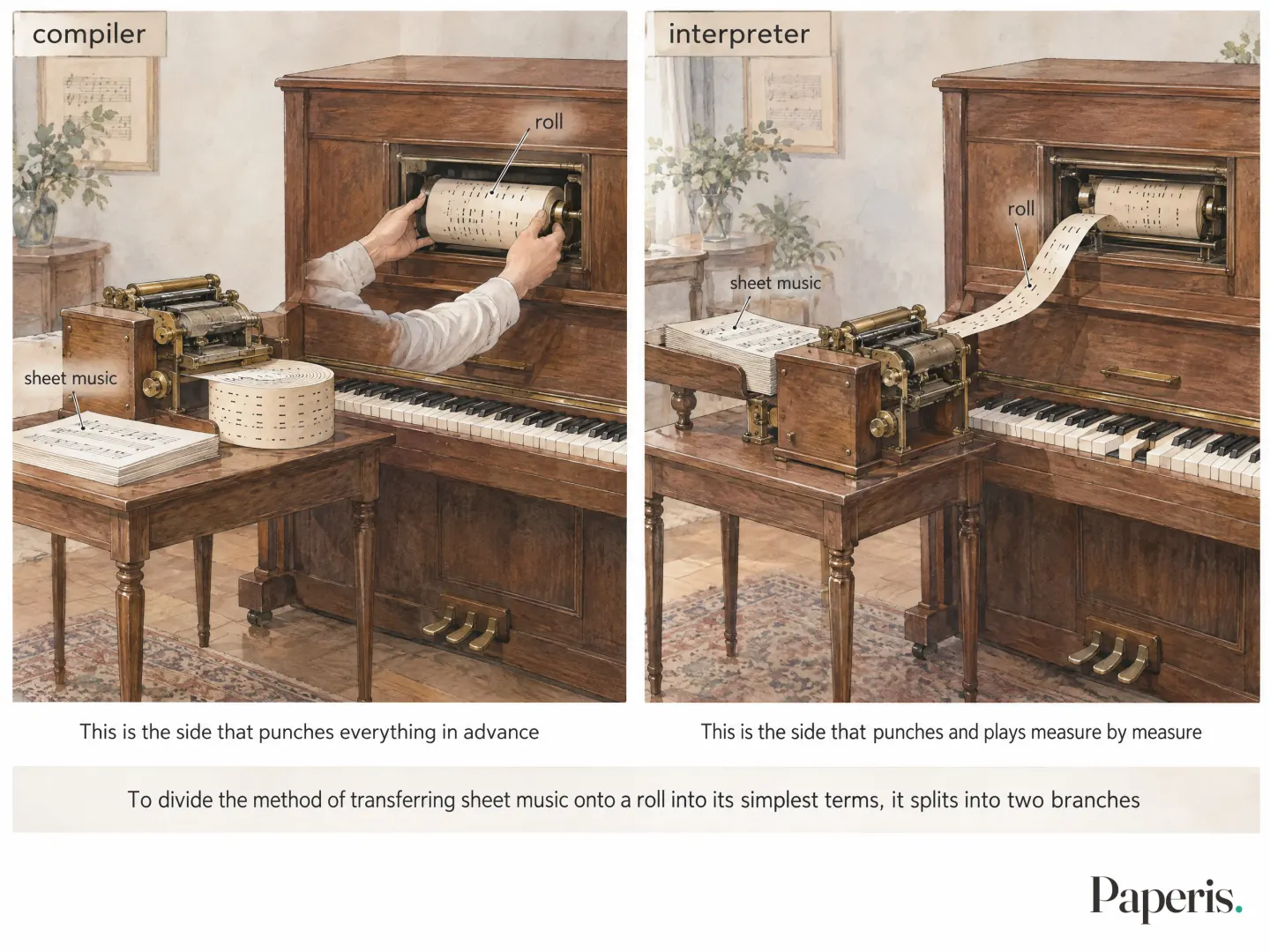
To divide the method of transferring sheet music onto a roll into its simplest terms, it splits into two branches. One is to punch the entire piece in advance and play it afterward. The other is to feed the piano a measure as soon as it is punched, play it, and move on to the next measure.
A compiler is a program that takes an entire program and translates it all at once into another language closer to machine language before executing it. (OpenStax Introduction Computer Science 5.2) This is the side that punches everything in advance. A compiler usually translates up to the language just above machine language, and another program takes charge of turning that into machine language one more time (OpenStax Introduction Computer Science 5.2). An interpreter is a program that takes a program line by line and executes it immediately while translating that line. (OpenStax Introduction Computer Science 5.2) (OpenStax Introduction Computer Science 7.1) This is the side that punches and plays measure by measure.
Code translated in advance can be fast to execute. In an experiment measured in a language called APL in the 1980s, compiled code was 2 to 10 times faster than an interpreter in several single-line calculations, and the gap widened further in programs that repeated the same task (DOI: 10.1145/22008.22029). However, the story can change if the time taken for translation is factored into the calculation. In a study that built a new interpreter for a distributed programming language, for small programs, the interpreter held its own compared to the combined time of compiling, linking, and executing, while the compiler pulled ahead for large programs. In many distributed programs where network costs account for the majority, the difference between the two was small (DOI: 10.1002/spe.393).
Attempts to bundle the two methods together also existed early on. A programming system released in 1971 included both an interpreter and a compiler to gain both the flexibility while writing and modifying programs and the efficiency of the finished program (DOI: 10.1145/942582.807994). Many modern languages mix the two methods (OpenStax Introduction Computer Science 7.1). They first translate it into an intermediate form, and usually do the final translation at runtime (OpenStax Introduction Computer Science 7.4). Whichever method is used, what the CPU actually executes is machine language, and source code written by humans must go through a compiler or an interpreter to be executed. (OpenStax Introduction Computer Science 4.1)
The Ingredients of Sheet Music: Bundles, Named Spots, Forks in the Road, and Repeats
Let us write down in words what a phone alarm app does. "Ring at 7 AM. If today is the weekend, do not ring. Ring again every 5 minutes until the user turns it off." What is needed to translate these three lines into a program?
The phrase that appears most often is "ring." Inside this word are bundled the tasks of making a sound, turning on the vibration, and popping up a dismiss button on the screen. Instead of rewriting all three every time you use them, you bundle them up once. A function is something that bundles multiple commands under a single name and lets you call just that name wherever it is needed. Both the morning alarm and ringing again 5 minutes later call a single name: "ring." If you want to change how it rings, you only need to fix that one function (OpenStax Introduction Computer Science 7.2). This is like writing down the chorus in song lyrics just once and repeatedly calling it by the name "chorus."
Then where do we put "7 AM"? Since the user might change it to 6:30, the program does not hardcode 7 AM inside the command, but instead keeps it in a named spot. That spot is in memory. Memory is a chip that stores data to be used in calculations and hands it back when needed. A variable is a spot in memory that a program has given a name to in order to store values. (OpenStax Introduction Computer Science 7.1) The name stays "alarm time," but the value inside can change from 7 AM to 6:30 while it runs (OpenStax Introduction Computer Science 7.2).
Should it ring if today is Sunday? A conditional statement is a command that makes the computer choose which path to execute depending on whether a question is true or false. (OpenStax Introduction Computer Science 7.2) If "Is today Saturday or Sunday?" is true, it goes down the path of not ringing; if false, it goes down the path of ringing. This plays the same role as a sign in sheet music that marks a fork in the road, saying, "When you come the second time, go to this measure."
What happens if the user does not turn it off? A loop is a command that makes the computer repeat the same commands until a set condition is met. (OpenStax Introduction Computer Science 7.2) "Ring again every 5 minutes until turned off" is just that. A repeat sign in sheet music does the same thing.
Named bundles, named spots, forks in the road, and repeats are included in most widely used high-level languages, even if their written shapes differ from language to language (OpenStax Introduction Computer Science 7.2).
It Does What It Says: Bugs
Let's imagine the creator of an alarm app wrote the weekend condition simply as "Is today Saturday?". The alarm rings at 7:00 AM on Sunday morning. What the creator wanted was to rest on the weekend, but what was written was only Saturday. The computer did what was written.
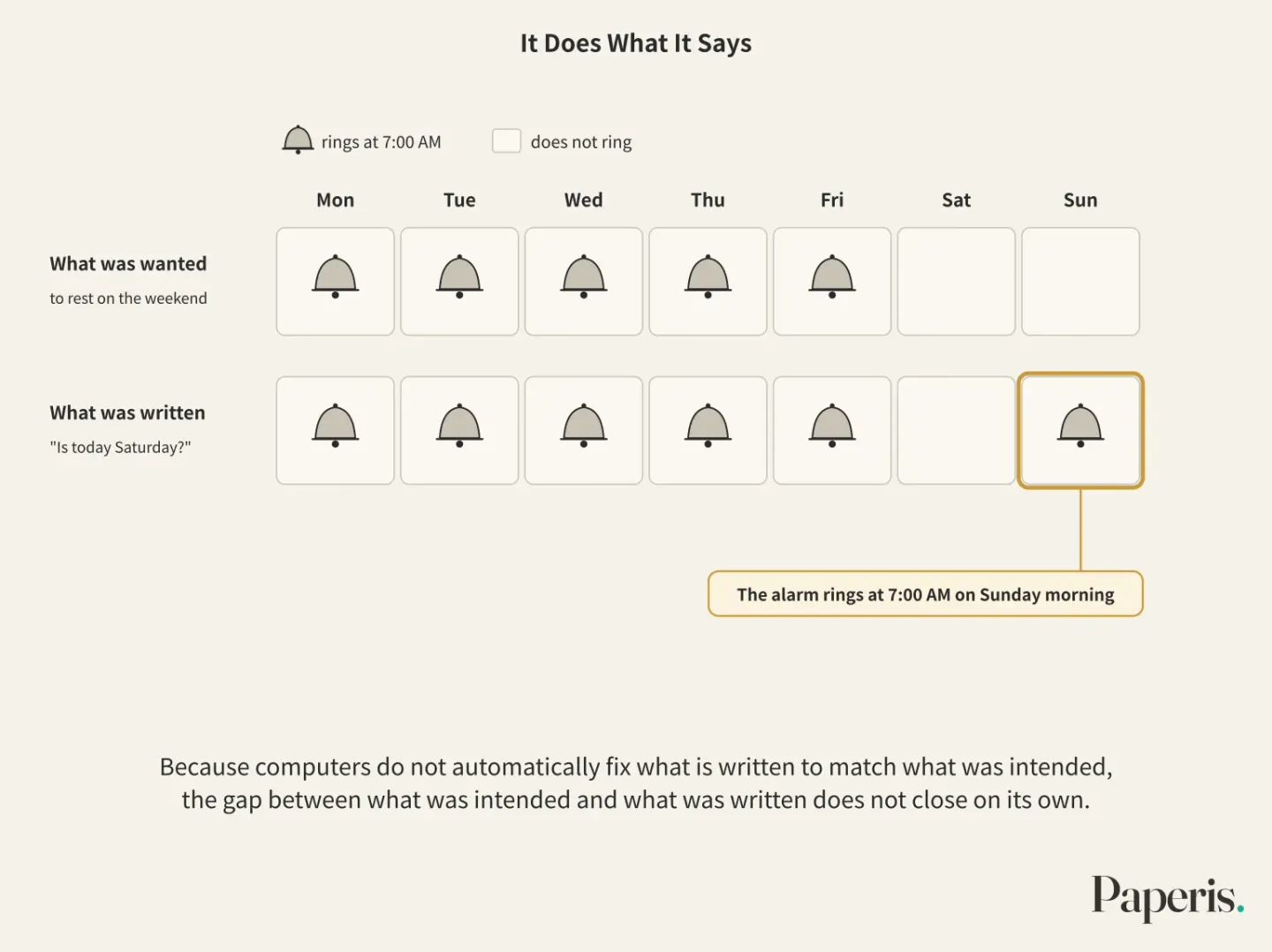
A bug is a mistake where what is written in a program deviates from what the creator wanted, producing an unintended result. Bugs sneak in unawares during the creation process (OpenStax Introduction Computer Science 9.2). A bug like the Sunday alarm does not get caught during the translation phase. What the compiler checks is whether the source code conforms to the formal rules of that language (OpenStax Introduction Computer Science 7.4), and it has no way of knowing what the creator intended. To put it in terms of a player piano roll, the holes were punched correctly according to the sheet music, but the sheet music itself had the wrong notes written on it.
Conversely, if the format is wrong, you get blocked right from the translation phase. When 124 computer science undergraduates at a university analyzed and categorized 598 errors found in assignment code submitted in a language called Java during their second semester, the most common category at 33% was missing a symbol that had to be there (DOI: 10.28945/4246). What makes this study striking is that these were mostly such formal errors, while logic errors like the Sunday alarm were left by the authors as a task to examine in the future (DOI: 10.28945/4246).
It is easy to think that "once you write a program correctly the first time, it never goes wrong," but building software does not happen without errors. Bugs have been a major problem for decades, and because they have a nature of hiding, finding them takes a lot of time and money. Sometimes, trying to fix bugs actually ends up increasing them (DOI: 10.46723/ojse.1.1.1). Because computers do not automatically fix what is written to match what was intended, the gap between what was intended and what was written does not close on its own.
Finding the Gap and Checking in Advance
Debugging is the work of finding where and why a bug occurred and fixing it. The process of building a program includes writing code alongside testing those pieces and fixing bugs (OpenStax Introduction Computer Science 9.2). It is like finding a wrong note by following a paper roll from the beginning, space by space, to match which hole differs from the sheet music.
In two experiments published in 1986, experienced programmers found bugs faster and more accurately than novices, primarily because they formed plausible guesses while looking at the code less. The authors attributed this foundation to the ability to understand programs, and this is a result confirmed in simple programs. Novices frequently added new bugs while trying to find original ones (DOI: 10.1145/22339.22367).
What helps when stuck has also been studied. A doctoral dissertation from the University of North Texas in the US analyzed the work records of hundreds of novice programmers. Records interpreted by the authors as code-reading behavior were more frequent among students who broke out of states where they were spinning their wheels in the same spot. In the states where they could not break out, patching was much more frequent, and among those, trivial patches appeared more often. This is the result of observing co-occurring behaviors. That one out of every three students who finished the assignment spun their wheels more than once is also a result of this dissertation (DOI: 10.12794/metadc2179234). Spinning one's wheels does not happen only to struggling students.
Testing is the work of running a program in advance to check if it moves as desired. For an alarm app, setting the date to Sunday and seeing if it rings is a test. Testing is the work of finding errors that slipped in unawares during building, and something that must be repeated throughout the building process (OpenStax Introduction Computer Science 9.2). Methods to automatically generate test inputs to find bugs are also being researched (DOI: 10.46723/ojse.1.1.1). Continuously releasing versions with revealed bugs fixed even after releasing the program is a part of software maintenance (OpenStax Introduction Computer Science 9.2).
Without Knowing the Floor Below: Abstraction
The person who made the alarm app wrote a command inside "ring" to make a sound. They did not write down how to move the phone speaker to make that sound. The floor below takes care of that job.
Abstraction is the act of leaving behind only what you need for the job at hand, and stripping away or hiding the details that do not matter. When building floors, it is used to hide the details of the floor below from the floor above. Computers can be explained as layers where this hiding is piled up in multiple folds (OpenStax Introduction Computer Science 5.2). High-level languages themselves are one layer that hides the details of the hardware, and without layers like this, even a single alarm app would have to be built from scratch with 0s and 1s (OpenStax Introduction Computer Science 7.1).
One example of a hidden floor below is a library. A library is a bundle of code made so that multiple programs can borrow and plug it in instead of writing the same feature from scratch. Programming languages usually come with bundles like this, so programmers call those functions without writing them separately (OpenStax Introduction Computer Science 7.1). You do not need to know how the inside is built (OpenStax Introduction Computer Science 7.2).
Further below sits the operating system. An operating system is the basic software that distributes and manages components between the hardware and the programs running on top of it. Tasks that need to use hardware, like making a sound, are not done directly by programs; they are requested of the operating system (OpenStax Introduction Computer Science 5.2). How those requests are handled is covered in "Operating Systems — The Caretaker Who Arrives First, the Meeting Room Everyone Takes Turns In" in this series.
A piano is also divided into layers. A person who writes sheet music writes a piece without having to know how hammers strike strings. Punching a paper roll punches holes according to the sheet music without needing to know the beauty of the song. The piano just reads the holes. Hiding things so the floor above can use them without knowing how the floor below works — thanks to that, we can write large programs. One introductory programming class reports that it has taught abstraction through exercises that divide large tasks, like a program that displays a calendar, into small pieces and define what each piece should do (DOI: 10.1145/1595496.1562939).
Back in Front of the Player Piano
The player piano showed us two things in this article. That machines move only as they are written, and that there is a translation work between what humans write and what machines read.
There are also places where the metaphor does not fit. A roll plays the same tune whenever it is played. Thanks to conditional statements, a program takes different paths depending on the day's input. If today is Sunday, it does something different from yesterday. Also, in this metaphor, moving the sheet music into holes looks like a person, but the compiler (OpenStax Introduction Computer Science 5.2) and the interpreter (OpenStax Introduction Computer Science 7.4) that actually do that work are also programs.
This kind of distinction is not easy for learners. One review collecting introductory programming education research picks out picturing what a computer does while a program runs as a major hurdle in introductory education, and suggests setting this clearly as a lesson goal and teaching it (DOI: 10.1145/2483710.2483713). Learners build up misunderstandings along with understanding, and beginners may find it difficult to distinguish what compilers, interpreters, and memory each do (DOI: 10.1145/3627829).
Where to Look Further
The cycle of the CPU fetching and processing machine language instructions one by one, and the idea that programs are also stored in memory like data, are covered in "CPU and Memory — A Desk That Gets Cleared, Library Stacks That Stay" in this series. Ordering the steps before moving them into a program is handled by "Algorithms — Calling Numbers One by One, Questions That Erase Half", and the path by which programs make requests without directly touching the hardware is covered by "Operating Systems — The Caretaker Who Arrives First, the Meeting Room Everyone Takes Turns In". How numbers and letters are represented with 0s and 1s can be found in "Bits and Data — Raised Dots and Flat Spots, a Code the Fingertips Know".
If you are curious about the switch at the bottom of the layer that opens and closes with electricity, it leads to "A Transistor Is a Switch — A Tiny Faucet You Open and Close with Electricity". Unlike programs where humans write down rules one by one, the method of finding rules from examples is in "AI Models — A Calculation That Learns From Examples Instead of Rules". What kind of trouble code with a missing check can cause can be seen in "Heartbleed and OpenSSL — When One Bounds Check Was Missing".
Source Papers
- "Introduction to Computer Science — 4.1 Models of Computation" (2024) — OpenStax Introduction Computer Science 4.1 — The only thing a computer executes directly is machine code, and other languages must be compiled or interpreted to run; it is virtually impossible for a human to write programs using machine code alone; programming languages are designed to suit the human side; "high-level" means a layer far from the hardware, and high-level languages are easier to write and typically slower.
- "Introduction to Computer Science — 5.2 Computer Levels of Abstraction" (2024) — OpenStax Introduction Computer Science 5.2 — Unlike algorithms, programs are written in a format that machines accept; the instructions a CPU receives are simple; machines do not know English, and high-level languages use only prescribed words and formats; a compiler is software that takes an entire program and translates it, while machine code translation is handled by another program (an assembler); an interpreter translates line by line; computers are explained in layers of hiding; hardware use is requested through the operating system.
- "Introduction to Computer Science — 7.1 Programming Language Foundations" (2024) — OpenStax Introduction Computer Science 7.1 — High-level languages hide most hardware details; without layers (abstraction), one would have to code from scratch using 0s and 1s; variables are names attached to memory locations; interpreters execute each line while translating it; many modern languages mix the two approaches; library functions are attached to the language.
- "Introduction to Computer Science — 7.2 Programming Language Constructs" (2024) — OpenStax Introduction Computer Science 7.2 — The value of a variable can change during execution; definitions of conditional statements (choosing a path based on true or false), loops (repeating until a condition is met), and functions (grouping and calling by name); fixing parts to be modified in one place using functions; such constructs exist in most languages; libraries are used without needing to know their internals.
- "Introduction to Computer Science — 7.4 Programming Language Implementation" (2024) — OpenStax Introduction Computer Science 7.4 — The hybrid approach translates into an intermediate form and usually converts it to machine code at execution time; compilers check whether source code conforms to the language's formal rules; an interpreter is also a program (the JVM).
- "Introduction to Computer Science — 9.2 Software Engineering Process" (2024) — OpenStax Introduction Computer Science 9.2 — The implementation phase includes writing code, partial testing, and bug fixing; errors creep in unnoticed during creation; testing must be repeated throughout the process; bug fixing continues even after deployment.
- "An APL/370 compiler and some performance comparisons with APL interpreter and FORTRAN" (1986) — DOI: 10.1145/22008.22029 — Code compiled with an experimental APL compiler was 2 to 10 times faster than the interpreter on several single-line functions, with the gap widening in iterative programs.
- "Compiler to interpreter: experiences with a distributed programming language" (2001) — DOI: 10.1002/spe.393 — For small programs, an interpreter holds its own compared to the combined time of compilation, linking, and execution; for large programs, the compiler takes the lead; in many distributed programs where network costs dominate, the difference is small.
- "Interpreter/compiler integration in ECL" (1971) — DOI: 10.1145/942582.807994 — Integrating interpreters and compilers into a single system to achieve both flexibility during design and debugging and efficiency in the final output.
- "Concept–based Analysis of Java Programming Errors among Low, Average and High Achieving Novice Programmers" (2019) — DOI: 10.28945/4246 — 598 errors found in Java assignments from 124 computer science undergraduates, with missing symbols making up the highest proportion at 33%. Primarily syntactic errors were analyzed, leaving logical errors for subsequent assignments.
- "Software Testing or The Bugs’ Nightmare" (2021) — DOI: 10.46723/ojse.1.1.1 — Software development cannot happen without errors, and bugs are difficult to find and expensive because of their tendency to hide, and often increase when fixed; an overview of automated test generation techniques.
- "Debugging by skilled and novice programmers" (1986) — DOI: 10.1145/22339.22367 — In two experiments, skilled programmers debugged faster and more accurately, largely thanks to forming better hypotheses by reviewing less code; beginners added bugs during debugging; the advantage of skilled programmers in simple programs appears to be due to program comprehension.
- "Novice Programmers' Unproductive Persistence: Using Learning Analytics to Interrogate Learning Theories" — DOI: 10.12794/metadc2179234 — A PhD dissertation from the University of North Texas. Work records of hundreds of beginners showed that breaking out of unproductive spinning was linked to behaviors interpreted as code tracing; those who remained stuck showed much more frequent and minor edits; one in three assignment completers also experienced unproductive spinning.
- "Introducing abstraction and decomposition to novice programmers" (2009) — DOI: 10.1145/1595496.1562939 — A report on using a perpetual calendar program assignment in introductory classes to practice breaking large problems into smaller pieces and assigning tasks to each piece.
- "Notional machines and introductory programming education" (2013) — DOI: 10.1145/2483710.2483713 — A review combining research on misconceptions and mental models. The computer's role during program execution (the notional machine) is a major challenge in introductory education, and the authors argue for teaching it as an explicit learning objective.
- "Computational Thinking and Notional Machines: The Missing Link" (2023) — DOI: 10.1145/3627829 — Learners build insights and misunderstandings together, and beginners may struggle to distinguish the roles of computer components such as compilers, interpreters, and memory.
Sources (16)
- Introduction to Computer Science — 4.1 Models of Computation
- Introduction to Computer Science — 5.2 Computer Levels of Abstraction
- Introduction to Computer Science — 7.1 Programming Language Foundations
- Introduction to Computer Science — 7.2 Programming Language Constructs
- Introduction to Computer Science — 7.4 Programming Language Implementation
- Introduction to Computer Science — 9.2 Software Engineering Process
- An APL/370 compiler and some performance comparisons with APL interpreter and FORTRANDOI 10.1145/22008.22029
- Compiler to interpreter: experiences with a distributed programming languageDOI 10.1002/spe.393
- Interpreter/compiler integration in ECLDOI 10.1145/942582.807994
- Concept–based Analysis of Java Programming Errors among Low, Average and High Achieving Novice ProgrammersDOI 10.28945/4246
- Software Testing or The Bugs’ NightmareDOI 10.46723/ojse.1.1.1
- Debugging by skilled and novice programmersDOI 10.1145/22339.22367
- Novice Programmers' Unproductive Persistence: Using Learning Analytics to Interrogate Learning TheoriesDOI 10.12794/metadc2179234
- Introducing abstraction and decomposition to novice programmersDOI 10.1145/1595496.1562939
- Notional machines and introductory programming educationDOI 10.1145/2483710.2483713
- Computational Thinking and Notional Machines: The Missing LinkDOI 10.1145/3627829